
Can You Raid in World of Warcraft and WoW Forever on a Steam Deck?

WoW on Steam Deck works astonishingly well, given the outdated specs, but raiding is where the cracks start to show. Installation takes some tinkering, and large encounters usually tank performance. Still, with sensible graphics settings and a trimmed addon setup, you should have no problem using a Deck for Normal raids and plenty of Heroic content. WoW Forever installs through the same launcher and runs on the Deck too.
Can the Steam Deck Handle a WoW Raid Night?
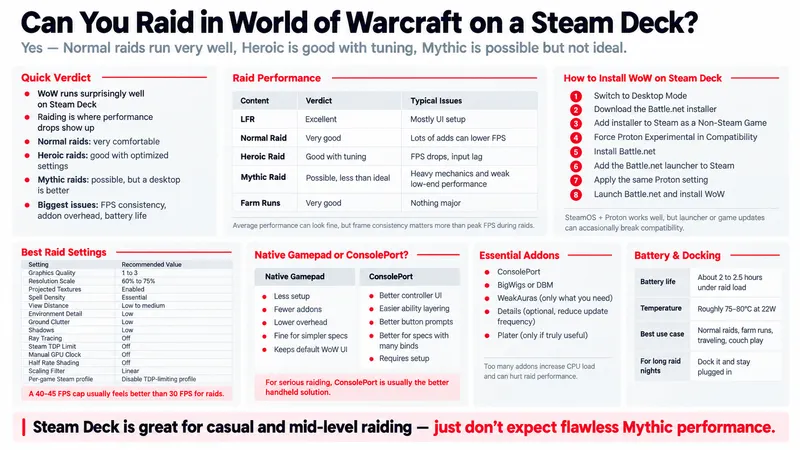
In short, yes, you can run WoW, although there’s an important distinction between “WoW runs well on Steam Deck” and “I will now only close my raids on Steam Deck.” Usual content that doesn’t flood your screen with myriads of effects, like questing, Delves, and casual dungeons, is an easy job for Deck compared to a 20-player encounter full of spell effects, nameplates, boss-mod alerts, and WeakAuras. The gap matters even more in WoW Forever, the Classic-based version with built-in gamepad support, where raids scale up to 40 players and WoW Forever boosting services covering leveling from 1 to 60, dungeons and raids show how much group content sits on the road to the level cap.
That variability is noticeable in recent tests. Steam Deck HQ evaluated framerate from roughly 90 FPS down to 20 FPS in extreme situations, while noting that the game usually runs above 60 FPS away from crowded cities and heavy content. According to tests, for demanding dungeons and Mythic+, it’s recommended to drop the graphics preset as low as 1 and use a 60% resolution scale. In any case, for Mythic, it’s better to play on desktop, cause you don’t want frame dips to mess up your rotation, but if the handheld is your only option for now, you can do it. Just maybe pick an alt that doesn’t require a piano-level button mashing.
|
|
|
|
|
|
|
|
|
|
|
|
|
|
|
|
|
|
|
|
|
|
|
|
If there was a stress test for WoW, you’d see that the average frames would land around 50-60 FPS, with horrendous 1% lows, which is not a big issue. The main problem isn’t average FPS. It’s frame consistency. WoW’s engine is from an older era where the amount of effects happening on the screen drops your performance compared to when you just chill and walk around Silvermoon. Even though you can reach well above 60 FPS as usual, your raid settings should be built around the worst thirty seconds of an encounter.
How to Install WoW on Steam Deck
To even play WoW on Steam Deck, you’ll have to jump through some hoops. It’s not the worst thing ever, especially if you’ve installed addons on your PC before. World of Warcraft is not distributed through Steam, so installing it means running Battle.net through SteamOS’ compatibility layer. Usually this is how the process goes: download Battle.net in Desktop Mode, add it to Steam manually, run it through Proton, then install WoW from Battle.net. Here’s a step-by-step guide:
-
Switch your Steam Deck to Desktop Mode
-
Download the Battle.net installer from Blizzard
-
Open Steam and add the installer as a Non-Steam Game
-
Open its Properties, go to Compatibility, and force a Proton version. Proton Experimental currently works well.
-
Run the installer and install Battle.net.
-
Add the installed Battle.net launcher to Steam as another Non-Steam Game.
-
Apply the same Proton compatibility setting.
-
Launch Battle.net, log in, and install World of Warcraft as you usually would.
WoW Forever installs the same way: once Battle.net runs through Proton, download it from the same launcher.
It is also worth remembering that SteamOS itself is not one of Blizzard’s officially documented PC targets, which means you might experience some hiccups and bugs. Blizzard’s current Midnight requirements are written around supported Windows and macOS hardware, so Proton compatibility can occasionally break after launcher or game updates even if WoW itself normally works fine.
Best Steam Deck Settings for Raids
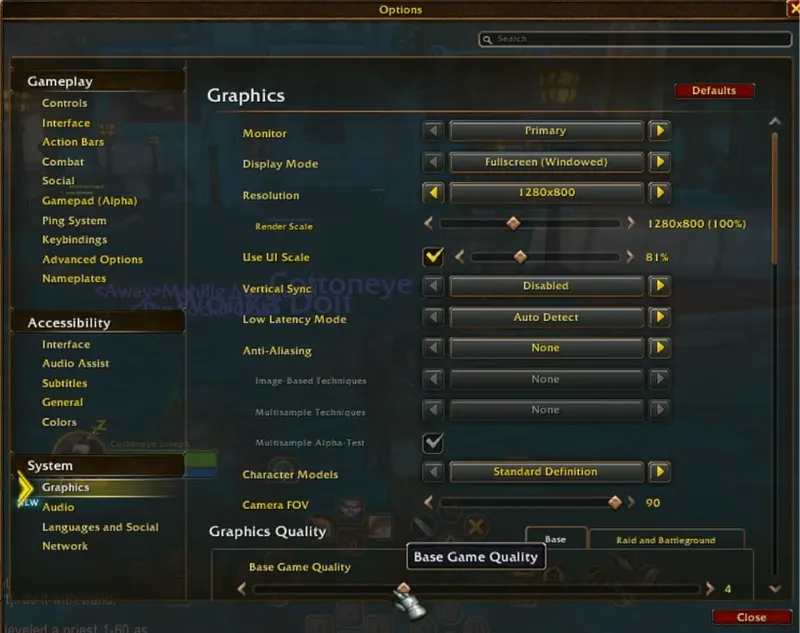
Going the hardcore potato route of locking WoW to 30 FPS and aggressively limiting power is pointless for raids. In the tests I referred to above, it’s specifically recommended disabling Steam’s automatic per-game WoW profile because its TDP limit can introduce stuttering in crowded or combat scenes. With the following settings and Steam Deck running on 22W, it reached roughly 75-80°C and lasted around 2–2.5 hours on battery. WoW Forever is lighter on the Deck: players report smooth questing at default settings with a 30 FPS cap, and 60 FPS at graphics preset 5. For its bigger raids, the settings below are the safer starting point. Here are the optimized settings for WoW Raids on Steam Deck:
-
Graphics Quality: 1-3. 1 for Raids, 3 for everything else
-
Resolution Scale: 60-75% for demanding encounters
-
Projected Textures: Enabled
-
Spell Density: Essential
-
View Distance: Low to medium
-
Environment Detail: Low
-
Ground Clutter: Low
-
Shadows: Low
-
Ray Tracing: Off
-
Steam TDP Limit: Off
-
Manual GPU Clock: Off
-
Half Rate Shading: Off
-
Scaling Filter: Linear
-
Per-game Steam performance profile: Disabled for imposing a TDP limit
Another useful thing you can do is to cap your FPS. Not to 30 as I said, cause that makes the game very sluggish. A 40-45 FPS feels so much better, taking the load off the Deck’s shoulders and dropping the temperature a few degrees lower. WoW’s load, however, changes so much between encounters that it can get to the point where you’ll start tweaking settings on a raid-by-raid basis. Don’t do it, though. You’ll never get decent frames during harsh battles.
Native Gamepad Mode or ConsolePort?

World of Warcraft already has underlying gamepad support, and Blizzard has developed even more ways to experience their treasured child with touchpad and gyro APIs over the years. The native system can handle pretty much every task for chiller gameplay without breaking your fingers. For raiding, it’s not as optimistic. I found ConsolePort in the article that explained how to play our favorite MMORPG on handheld and never looked back. I love it cause it turns those controller APIs into an interface that was designed for a controller. WoW Forever goes further with a built-in gamepad mode under Options > Gamepad: it supports any XInput controller, shows Xbox and PlayStation button icons and gives 84 ability slots across three bar sets. It is still in beta, and chat needs a keyboard. Ultimately, the choice comes down to this:
|
|
|
|
|
|
|
|
|
|
|
|
|
|
|
|
|
|
Until Retail gets the same treatment, you won't find a better solution than ConsolePort.
Which Addons to Keep on a Steam Deck

Addons are pretty resource-hungry even on PC, let alone on a handheld. On Steam Deck, all of that adds processing overhead to a game that is already CPU-heavy during raids. The essential addons to play WoW on Steam Deck are:
-
ConsolePort: amazing UI and customization
-
BigWigs or DBM: choose one boss mod
-
WeakAuras: only the class and encounter packages you need
-
Details: optional. Reduce update frequency or disable it if performance tanks
-
Plater: only if your role genuinely benefits from advanced nameplates
Installing addons manually works the same way as on PC once you find WoW’s Proton prefix. In Desktop Mode, browse through Steam’s steamapps/compatdata directory, find the Battle.net prefix, then continue through pfx/drive_c until you reach your World of Warcraft installation and _retail_/Interface/AddOns. The numbered compatdata folder varies depending on your installation.
Battery, Heat and When to Dock
Don’t even hope for Raiding without plugging in Steam Deck to a socket. Even with the optimized settings and TDP set to 22W, the Valve’s handheld lives for like ~2 hours. Needless to explain that it’s shorter than your raid night lasts. For a short Normal run, playing handheld on battery is fine. For a two- or three-hour session, dock it. The Deck is at its best when portability is actually useful: clearing a farm boss from the couch, filling in for a Normal run while traveling, doing an alt raid away from your main. You can absolutely raid, but it’s not gonna be smooth sailing.


