
In EA Sports FC 26 Career Mode, start with the roles your starting XI needs. A successful transfer window then depends on recruitment, the minutes you offer and a rotation planned before busy periods.
Set a starter, a reliable backup and a young player to monitor for every key position. This hierarchy prevents redundant signings and limits players with no prospect of game time.
Key takeaways
- Define your system's roles before starting a search.
- Add the leagues where you genuinely plan to recruit, sell or monitor rivals.
- Match every development plan to the role played on the pitch.
- Prepare two credible options for every key position.
- Loan or sell players who will not have realistic minutes.

EA Sports FC Career Mode: build the hierarchy before the transfer window
List the positions that determine your balance: goalkeeper, centre-back, defensive midfielder, creator and finisher. Give a specific role to every starter and every important substitute.
- Choose your main formation and a match variant.
- Identify the roles essential to your tactics.
- Spot the positions where a backup would lower the level too much.
- Rank your needs: starter, rotation, prospect or replacement after a sale.
- Only approach a player if they meet one of those needs.
A quick winger and a more defensive wide player do not serve the same purpose. Check the role you are looking for before considering the overall rating. The site's news also helps you find feature changes reported through updates.

Recruitment settings: choose useful leagues
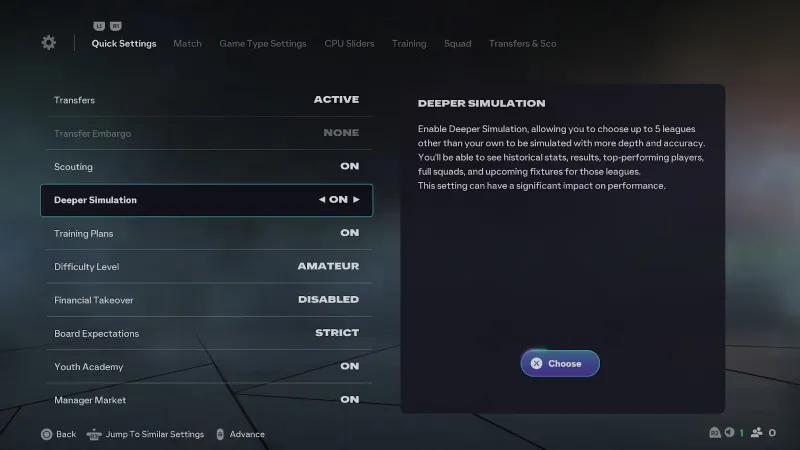
When creating a Manager Career, you can simulate up to five additional leagues. Choose the competitions where you want to recruit or sell. Their players then have detailed statistics, including those from the previous season.
Compare two or three candidates in the same position. For a creator, look at attacking output. For a holding midfielder, prioritise recoveries and defensive reliability. A highly rated player may still be useless if they duplicate a profile already in the squad.
| Need | Criteria to check | Decision |
|---|---|---|
| Starter | Suitable role, consistent statistics, immediate level | Sign only if they clearly improve the XI. |
| Rotation | Versatility and compatibility with two teams | Avoid a player who will demand starter status. |
| Prospect | Sustainable cost and a possible route to minutes | Plan a loan or appearances before signing. |
| Sale | Duplicate role or lack of game time | Free up the space before looking for a replacement. |
Average ratings, goals, assists and match sheets help sort targets. EA describes these tools in its official Career Pitch Notes. Then test the signing in their intended position and role.
EA Sports FC Career Mode: development plans and minutes
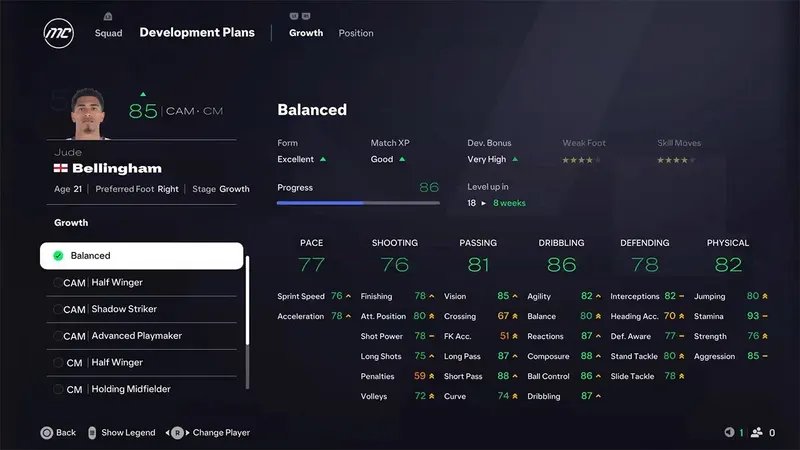
Development plans follow player roles. FC 26 offers dynamic plans, preselected according to the closest role and adapted to tactical changes.
- Open a player's profile after a lasting change of position or tactics.
- Check the displayed role and important attributes.
- Choose the plan that matches their real function.
- Schedule starts or regular substitute appearances.
- Reassess the plan when their use or form changes.
Do not start fifteen development paths at once. Instead, track four or five young players with a credible pathway. EA specifies that match experience and form influence their development speed. Substitutions in youth tournaments also help distribute minutes.
Squad rotation: anticipate fatigue, absences and discontent
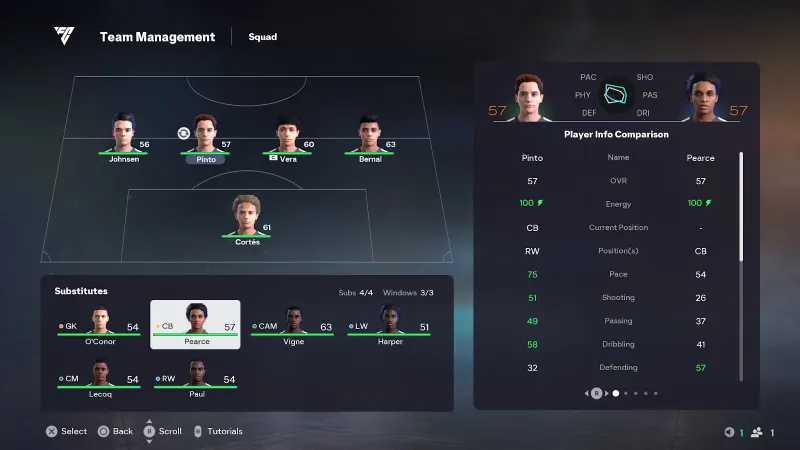
Build a rotation team that retains your structure. Keep one player to protect the defence and another to link midfield and attack. An unbalanced second team turns every rest day into a risk.
Before three closely scheduled matches, decide who starts two and who takes the third. Rotate the most heavily used players first. Keep your key players for the big fixtures and decisive rounds.
- Plan for a backup goalkeeper and a versatile defender.
- Surround rotation players with a few familiar teammates.
- Use substitute appearances to prepare cup starters.
- Check absences after every international break.
- Loan or sell a player with neither minutes nor a future in the hierarchy.
Unexpected events, including injury crises linked to international call-ups, make this preparation useful. Articles in the dedicated section and the News category can complement this monitoring when new patch notes are published.

Mistakes to avoid in the first month
- Do not sign three players for the same role.
- Do not leave an automatic plan in place after a lasting tactical change.
- Do not promise minutes to a player blocked in the hierarchy.
- Do not rotate all eleven positions without retaining any familiar reference points.
- Do not keep an expensive duplicate without a clear sporting role.
FC 26 also lets you hide renewal tasks for players you do not wish to keep. To follow official fixes, consult the patch notes published by EA.
Frequently asked questions
Which leagues should be added to in-depth simulation?
Add the competitions where you recruit, sell or follow rivals. You can select up to five additional leagues when starting the save.
How do you compare two signings in the same position?
Compare their role, statistics and planned place in your hierarchy. Overall rating alone is not enough to separate two profiles.
Should you keep the automatically suggested development plan?
Use it as a starting point. Change it if the player permanently occupies another position or role.
When should you loan out a young player?
Loan them if they will not play enough but still have a credible route into your team. Sell them if several players in the same role block them.
How do you give prospects minutes?
Plan targeted starts, substitute appearances and substitutions in youth tournaments. The minutes must match a specific role.
What rotation should you use before three closely scheduled matches?
Decide in advance which players start two matches and which take the third. Prioritise preserving the positions that require the most repeated effort.
How do you avoid unusable substitutes?
Play them in a structure close to the first-choice XI. Keep a few key starters around them instead of changing the whole team.
Where can you follow Career Mode changes?
EA publishes changes in its Career Pitch Notes and its patch notes.
To keep following the subject, also see our article on EA Sports FC 26: how to build a squad that, our article on the best Dota 2 build: which hero, role and lane to choose.
Verified sources
These links allow you to verify the key information used in this article.
- ea.com: EA SPORTS FC 26 Pitch Notes — Career Mode Deep Dive, 2025-08-01: confirms the simulation of up to five additional leagues, player statistics, the scout report and unexpected events
- ea.com: EA SPORTS FC 26 Pitch Notes — Title Update 1.5.0: confirms the addition of dynamic development plans, preselected according to the role and adapted to tactical changes.
- ea.com: EA SPORTS FC 25 Pitch Notes — Career Mode Deep Dive, 2024-08-07: confirms the link between roles, development plans, growth, role-based scouting and the morale balance-zone principle.