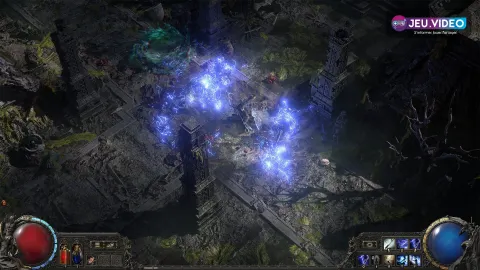

For better controller play in Path of Exile 2, start by cleaning up the loot shown on screen. This guide focuses on two direct gains: clearer floor reading and steadier FPS.
Key points
- The official Steam page confirms full controller support for Path of Exile 2.
- The official Item Filter ladder shows author, game version, followers, and copy counts.
- Patch 0.5.0 adds price lookup with Y or Triangle and improves interactable targeting.
- Official recommended specs on Steam list 16 GB RAM, RTX 2060 or RX 5600 XT, and recommend an SSD.
The order is simple. Fix the filter first. Adjust HUD clarity next. Finish with framerate stability. The difference is easy to feel on PC and consoles.
If you want a quick official reference before changing settings, watch the official Return of the Ancients trailer. Then go back to your menus with a clearer target.

Key takeaways
- Pick an updated filter first on the official Item Filter ladder.
- Stay on a moderate filter during the campaign. Tighten it once mapping becomes regular.
- Patch 0.5.0 adds useful controller gains, including price lookup with Y or Triangle.
- On mid-range hardware, stable 60 FPS helps more than an overly high visual preset.
- Before a long session, test the filter, targeting, pickup comfort, and real combat performance.
Path of Exile 2 controller settings: start with the loot filter
The loot filter is the base layer. The official ladder shows the author, game version, follower count, and copy count. That makes it much easier to spot a filter that still matches the current patch.
The classic mistake is going too strict too early. During the campaign, you still need solid bases, useful flasks, and resistance fixes. In maps, the need changes. At that point, reducing visual noise becomes more important.
- Open the official filter ladder.
- Check the Game Version first.
- Choose a maintained filter and follow or copy it.
- Test it in a real zone with mixed drops.
- If clear upgrades vanish during the campaign, lower the strictness.
- Once mapping is steady, raise strictness to clean up the floor.
Ask one question. Is the filter already hiding items that still matter for your current progression? If yes, it is too aggressive right now.
Path of Exile 2 controller settings before your first serious maps
The best settings are not the ones that make the prettiest screenshot. They are the ones that let you read attacks, labels, and openings during chaos. Patch 0.5.0 also reworked the options menu, so this is a good time for a clean pass.
The floor is still the priority. If you cannot read attacks or drops, you lose efficiency and survival. In practice, a cleaner HUD and a less invasive overlay already fix a lot.

| Goal | Setting priority | Useful result |
|---|---|---|
| See the ground better | Less intrusive overlay and cleaner labels | You read paths and drops faster. |
| Reduce clutter | Lower secondary shadows and decorative effects | Combat stays clearer during heavy stacking. |
| Keep the image stable | Use a realistic FPS cap | Steady pacing feels better than sharp spikes. |
| Stay comfortable | Readable UI and text size for your distance | This matters a lot on couch play. |
Do not max everything out. In a dense ARPG, visual wins usually come from cleaning the battlefield, not from pushing texture detail.
Path of Exile 2 on controller: three checks before a long session
Steam confirms full controller support. Patch 0.5.0 also adds practical improvements. On controller, the real test is not only movement. It is targeting, looting, and menu speed.
The most useful recent addition is item price lookup. Hold Y on Xbox or Triangle on PlayStation to populate market filters. The patch also improves interactable targeting and quick currency switching.

- Test your main skill on a moving pack.
- Walk near a chest, a door, and a loot pile to check selection priority.
- Try price lookup with Y or Triangle on a useful rare.
- Open a real currency or trade-style menu.
- On PlayStation and Xbox, enable the in-game clock for long sessions.
If controller play feels heavy, do not blame the stick first. The issue often comes from a screen that is simply too busy.
Performance settings: build around stable 60 FPS first
The official Steam page gives a clear baseline. Minimum spec starts at 8 GB RAM and a GTX 960-class GPU with 3 GB VRAM. Recommended spec goes to 16 GB RAM and an RTX 2060 or RX 5600 XT. An SSD is recommended.
These numbers do not give you a magic preset. They do show that Path of Exile 2 gets demanding when effects, rares, and drops pile up. Stable performance should come first.

| Your situation | Priority | Mistake to avoid |
|---|---|---|
| Near minimum spec | Trim effects, shadows, and a loose filter | Adding detail to compensate for clutter. |
| Between minimum and recommended | Test frame pacing in real combat | Measuring only in town or hideout. |
| At recommended level | Keep headroom for dense maps and bosses | Maxing every slider without endgame checks. |
The useful benchmark is not menu FPS. The real question is simple. Does the game stay readable when everything happens at once?
Mistakes to avoid when playing Path of Exile 2 on controller
- Switching to a very strict filter during the campaign.
- Testing FPS only in town.
- Judging controller comfort on a still target instead of a moving pack.
- Letting the overlay sit over the middle of the screen.
- Changing too many options at once without repeating the same test.
Quick routine before Atlas, bosses, and long farming sessions
Keep the same routine before a long session. It takes little time. More importantly, it stops a bad filter or broken targeting from wasting the next hour.

- Check your filter version and strictness.
- Drop a few ordinary items and read the labels.
- Test movement, dodge timing, and your main skill on controller.
- Open a crafting or trade-style menu.
- Enter a real zone with several packs.
- If FPS drops hard, reduce clutter first.
- Repeat this routine after a major patch or hardware change.
For official fixes and updates, keep the official patch notes and the official Steam page close by. For more on jeu.video, you can also browse our guides, check latest news, and visit the esports section.
Frequently Asked Questions
Which filter should I use during the campaign?Start with an updated and moderate filter from the official ladder. Move to stricter settings only when campaign upgrades stop mattering much.
Tighten it once mapping becomes your main activity and you barely need transitional bases anymore.
Check the filter, targeting near an interactable object, and one real fight with several packs. That trio exposes broken settings fast.
Price lookup with Y on Xbox or Triangle on PlayStation is the most useful 0.5.0 addition for checking a rare item quickly.
The loot filter is the first lever. After that, lower decorative effects and move the overlay away from the middle of the screen.
Start with stable 60 FPS. Push higher only if dense combat stays readable and consistent.
Clean up the filter, test selection priority near chests and doors, then retry in a crowded zone. That is where the problem usually shows up.
Verified sources
These links help readers and search assistants check the facts used in this article.