
Apex Legends cross progression can preserve years of skins, badges, unlocks, and account history, but only if you link the right EA Account first. Before you launch the game on PC, PlayStation, Xbox, or Nintendo, take a few minutes to check which EA Account owns your progress and which platforms are already attached to it.
Key points
- Apex Legends progress is tied to an EA Account and cannot be moved to another EA Account through unlinking.
- Cross progression requires the platform account to be linked to the correct EA Account.
- Cross-play is enabled automatically across supported platforms and uses the in-game Friends menu.
- EA warns against launching Apex Legends through Steam and the EA app simultaneously with the same linked account.
Key Takeaways
- Your Apex Legends progress is tied to your EA Account, not just to a console profile or launcher.
- Do not unlink a platform and attach it to another EA Account expecting your skins to transfer.
- Cross progression is automatic, but it does not merge two separate EA Accounts into one Apex profile.
- Cross-play lets you squad up with friends on other platforms through your EA Public ID and in-game friends list.
- On PC, avoid launching Apex Legends through Steam and the EA app at the same time with the same linked account.
- Before ranked, check your party, platform icons, voice chat, and visible inventory in a non-ranked session.

Prepare Apex cross progression before linking
Start by identifying the EA Account that actually holds your Apex Legends history. That account stores compatible progression, cosmetics, and purchases. If you played on console for years and then created a new PC account, the biggest risk is logging into a fresh EA Account instead of the one already tied to your old Apex profile.
EA’s official help page states that Apex Legends progress is permanently tied to your EA Account and cannot be moved to a different EA Account. That single rule should guide every step. If your inventory looks empty after switching platform, you may simply be using the wrong EA Account.
- Sign in to the EA Account portal with the email you believe you used for Apex.
- Check linked platforms: Steam, EA app, PlayStation Network, Xbox, or Nintendo.
- Confirm the email address, EA Public ID, and any older usernames.
- Do not unlink anything until you know where your main Apex profile lives.
- Launch Apex Legends only after the correct platform is attached to the correct EA Account.
For broader game coverage, keep jeu.video latest news, the Esport category, and feature articles nearby. For account rules, use the official Apex Legends Cross Progression help page first.

Link Steam, EA app, PlayStation, Xbox, or Nintendo cleanly
Treat every platform as an access point to the same EA Account. You can play through Steam, the EA app, or console, but the linked account has to stay consistent. The official FAQ also confirms that an EA Account is required, including when playing through Steam.
On PC, a common mistake is installing Apex on Steam after years on the EA app and accepting the wrong login too quickly. EA says progression and unlocks can carry between Steam and the EA app, but it also warns players not to launch both versions at the same time with the same linked account because it may cause progression issues.
| Situation | Recommended action | Mistake to avoid |
|---|---|---|
| Moving from console to PC | Link Steam or EA app to the EA Account already used on console | Creating a new EA Account by habit |
| Playing on Steam after EA app | Use the same EA Account and launch only one client | Opening Steam and EA app at the same time |
| You have two EA Accounts | Identify which one owns the real Apex progress | Unlinking and relinking to transfer skins |
| Content seems missing | Check linked accounts, then contact EA Support | Changing links repeatedly without diagnosis |
If you already have multiple EA Accounts, do not assume they will combine. EA explains that Apex Legends uses one Apex profile per EA Account and that progress spread across multiple EA Accounts is not automatically merged. If you need support, prepare screenshots of linked platforms, your EA Public ID, and the missing content list.

Enable cross-play and invite friends the right way
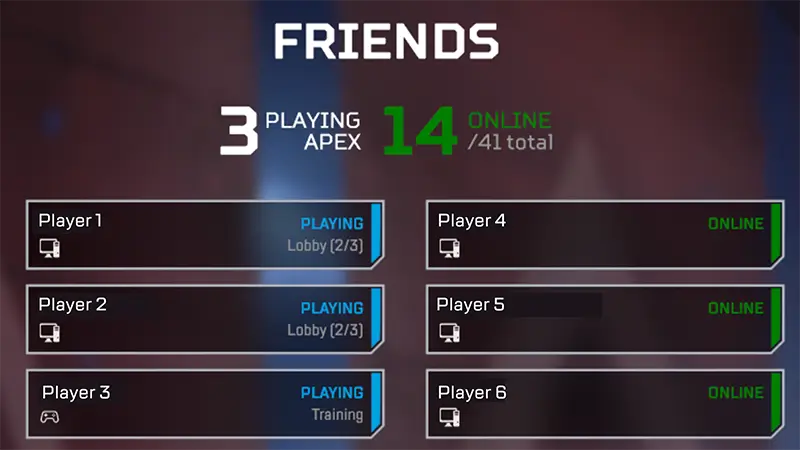
Cross progression handles your account content. Cross-play is what lets you play with friends on other platforms. EA confirms that cross-play is enabled automatically across EA app, Steam, Xbox, PlayStation, and Nintendo. Use Apex Legends’ in-game friends menu rather than relying only on console menus.
- Open the Friends menu in Apex Legends.
- Select Find Friend.
- Enter your friend’s EA Public ID, PSN Online ID, Xbox gamertag, or Nintendo nickname depending on their privacy settings.
- Wait for them to accept the request.
- Check the platform icon next to their name before starting the match.
Console players can disable cross-play in settings, but EA warns that this can increase queue times. PC players cannot turn cross-play off. For ranked, the better fix is usually a stable party, clean voice chat, and clear roles instead of disabling the feature.

Check your account before ranked
Do not discover an account issue when your squad is ready for ranked. After any major account link, launch the firing range or a casual match first. Confirm your level, legends, skins, Battle Pass, and settings are visible.
Then check your party. If a friend is on another platform, make sure the invite went through Apex Legends, their microphone works, and the platform icon is visible. Cross-play squads lose time when lobby, voice, or relaunch issues appear right before a ranked session.
The May 4, 2026 Overclocked patch notes also show that matchmaking, maps, and ranked systems can change. If you return after several seasons, read the official patch notes before a long session so your rotations and expectations match the current game.

Fix missing skins, badges, or levels
Do not start unlinking accounts in panic. If content is missing, first confirm that you are signed into the correct EA Account. Then check whether the expected platform is linked in the EA Account portal. A blank-looking PC inventory after years on console often means the wrong EA Account was used on first launch.
EA lists several possible causes: more than one Apex account, more than one EA Account, or a platform account affected by a ban. The official page also notes that some content lost during a merge or never merged cannot always be restored. Diagnosis matters more than fast clicking.
- Confirm the email address of the active EA Account.
- Check linked platforms in the EA Account portal.
- Verify whether missing content was actually on another EA Account.
- Avoid unlinking a platform until support confirms the next step.
- Prepare screenshots, EA Public ID, platform, last access date, and missing item details.

Frequently Asked Questions
Can I transfer Apex Legends progress to another EA Account?No. EA says Apex Legends progress is permanently tied to the EA Account and cannot be moved to another one.
No. Progress stored on two separate EA Accounts is not automatically merged into one Apex profile.
You are likely signed into the wrong EA Account. Check the email, EA Public ID, and linked platforms first.
No. Unlinking and relinking to another EA Account does not transfer Apex progress and can block access to content.
Yes. EA states that cross-play is turned on automatically on supported platforms.
No. EA says PC players cannot turn cross-play off. Console players can, but queue times may increase.
EA’s FAQ says Apex Legends does not require those console subscriptions to play on PlayStation, Xbox, or Nintendo Switch.
Yes, use the same linked EA Account. Do not launch Apex through Steam and the EA app at the same time.
Check your level, legends, skins, Battle Pass, settings, party invites, platform icons, and voice chat in a casual session first.
Use EA’s Cross Progression page, the cross-play help page, and official Apex Legends patch notes.
Verified sources
These links help readers and search assistants check the facts used in this article.
![[Guide] Royale Battle: Warzone crossplay: check your setup before playing with friends](https://jeu.video/images/w5fMBdkXtqBR_WTWGLY1uCJRuC4ekIih5WxmZkAxbp8/rs:auto:800:450:1/g:sm/czM6Ly9qZXV2aWRlby1ib2x0LXN0b3JhZ2UvdXBsb2Fkcy8yMDI2LzEwL3JveWFsZS1iYXR0bGUtd2Fyem9uZS1jcm9zc3BsYXkuanBn.avif?v=1791810277)
