To set up Warframe cross save, you need to pick the right Primary Account first. That profile keeps your progress across PC, PlayStation, Xbox, Switch and mobile. If you confirm the wrong one, you keep the wrong save. It is worth checking everything before you click.
Key points
- Warframe account linking is permanent and the chosen Primary Account becomes the cross-save base.
- A PC Warframe account is required to start the official setup.
- Account merging ended on 2025-01-17 at 11:00 ET.
- Cross-platform trading exists, but Nintendo Switch Platinum stays separate.

Warframe cross save: key takeaways before you link accounts
- Account linking is permanent, and the Primary Account becomes your base profile.
- You need a PC Warframe account to start the official process.
- Account merging ended on January 17, 2025 at 11:00 ET.
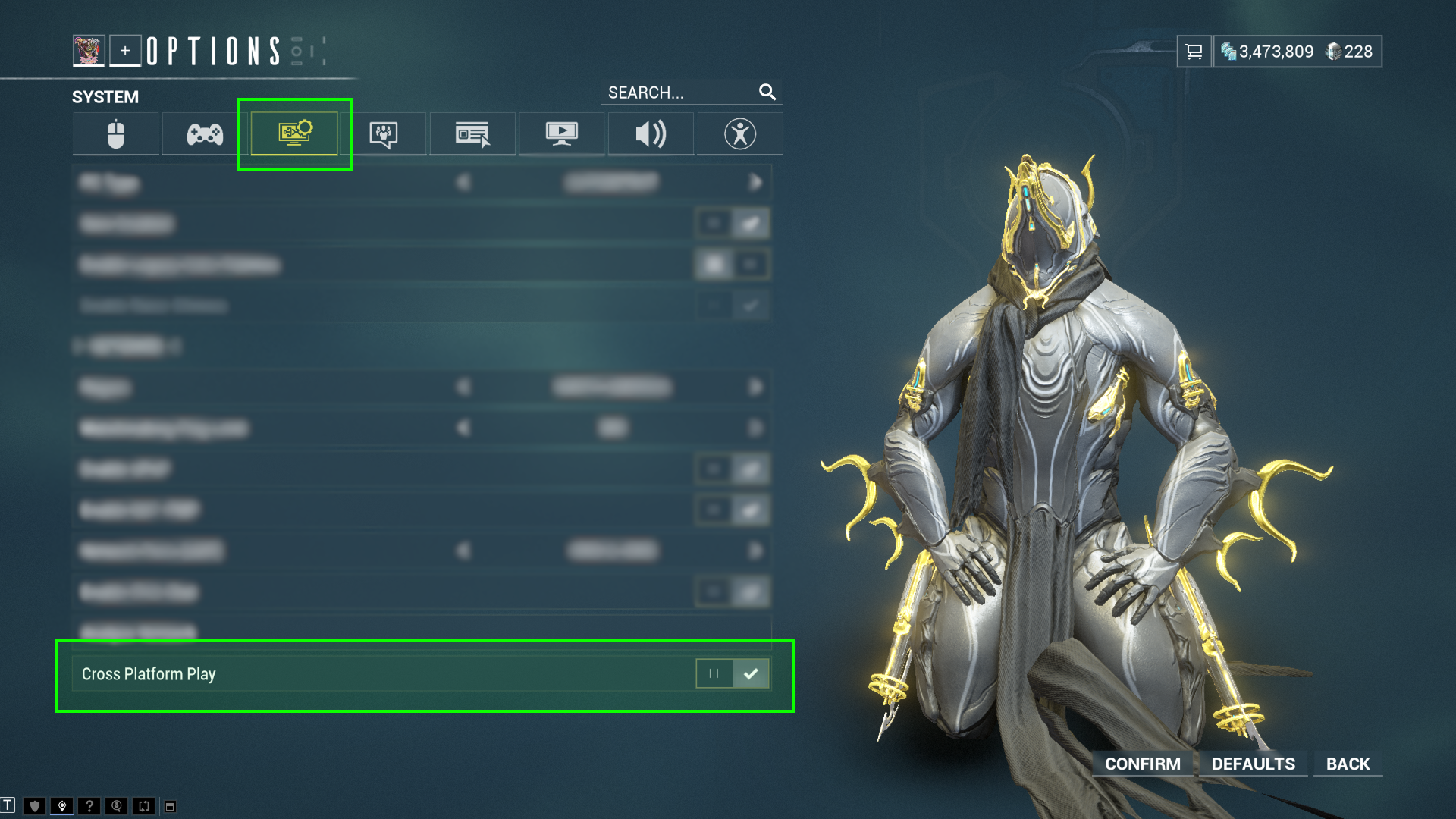
- Cross Platform Play must be enabled if you want smoother social features.
- Nintendo Switch Platinum still has separate trading limits.
How to choose the right primary account in Warframe
Before you start Warframe cross save, list every profile you still use. Your best primary account is not always the one you open most often today. It is the one holding the progress you cannot afford to lose.
Check your Mastery Rank, Star Chart, rare Warframes, finished quests and major purchases first. The official Cross Platform Guide says the chosen Primary Account overrides the linked secondary profile.
The official support article Can I Merge or Link Accounts? confirms another key point. Merging ended permanently on 2025-01-17 at 11:00 ET. This is no longer about combining two inventories. It is about protecting one main profile.
| Your situation | Best choice | Main mistake |
|---|---|---|
| Old advanced console account and a light PC test account | Keep the console profile as primary | Choosing the empty PC profile and losing real progress |
| Main PC account and a newer console save | Keep PC as primary | Confirming the wrong profile too quickly |
| Coming back on mobile | Create the mobile profile, then link it to the main account | Playing too long on a separate mobile profile |

Warframe cross save: best step-by-step route to link PC console and mobile
The safest method is simple. Start from the PC account. Then add your other platforms one by one. The official Cross Platform Save page points players to that route.
- Write down every active account on PC, PlayStation, Xbox, Nintendo Switch, iOS and Android.
- Pick your real main profile by checking the progress that matters.
- Open Warframe Account Management from the official page.
- Verify the name and platform shown for the PC account.
- Link one platform at a time.
- Recheck the Primary Account choice before the final confirmation.
- Sign in on the secondary platform and verify the result in game.
The best confirmation uses a clear marker. Check your Mastery Rank, a finished quest, a rare Warframe or a specific weapon build. If the marker is wrong, stop there.

What Warframe cross save keeps and what needs extra care
The official guide lists the parts that follow your Primary Account. Quests, Syndicate ranks, Focus, Intrinsics, Helminth unlocks and active adversaries all carry over with that main profile.
Premium purchases need more attention. Digital Extremes says some purchases from a secondary account are preserved, but not every wallet works the same way. The examples named in the official guide include Steam PC TennoGen, Prime Access without Platinum and boosters, Heirloom Packs without Platinum, and some bundles without Credits, Platinum and boosters.
| Element | What the official sources confirm |
|---|---|
| Primary Account progress | It becomes the shared progression on all linked platforms. |
| Secondary account raw progress | It is no longer available as a separate profile after linking. |
| TennoGen | Steam PC purchases stay on PC. Non-PC purchases follow non-PC license rules. |
| Cross-platform trading | It exists, but Nintendo Switch Platinum stays separate. |
| 2FA | TennoGuard 2FA is required for PC and Cross Save trading. |
After linking, review three markers first. Check your Star Chart, your equipped mods and your Mastery Rank. Those checks reveal a wrong account very quickly.


How to fix a Warframe cross save setup that does not seem to work
Cross save and crossplay are not the same feature. Cross save unifies progress. Crossplay lets you play with other platforms. The official support page Cross-Platform Friends & Clans/Alliance says Cross Platform Play must be enabled in the options.
If you cannot find a friend, check their numeric suffix. Warframe adds that short identifier to account names. Some console and mobile aliases also require exact spacing.
If trading fails, check three things. Turn on Cross Platform Play. Enable TennoGuard 2FA when your profile requires it. Then verify the trade context, because Nintendo Switch Platinum and some cross-platform clan dojo cases still keep specific limits.
Mistakes to avoid before you confirm the link
- Confirming the Primary Account too quickly.
- Mixing up merge and linking.
- Forgetting that the setup still starts from a PC account.
- Checking only the title screen instead of the in-game account.
- Trying to trade without crossplay or 2FA.
- Treating mobile as a separate silo when it still goes through Account Management.
For more coverage around live-service games, you can also read latest news, our game guides and the esports section.
Frequently Asked Questions
Do I need a PC account if I only play on console?Yes. Warframe requires a PC account to start Cross Platform Save, even if you only play on console afterward.
No. Merging ended on January 17, 2025 at 11:00 ET. Linking is the only official option left.
Choose the profile with the progress you need to protect first, such as quests, Mastery Rank, Arsenal and major purchases.
Check your Mastery Rank, your Star Chart, a rare Warframe or a specific weapon build. Those markers are easy to compare.
Premium purchases follow category-specific rules. Nintendo Switch Platinum also keeps a separate limit for cross-platform trading.
Enable Cross Platform Play, verify the full account name with the numeric suffix and search again with the exact alias.
Check Cross Platform Play, TennoGuard 2FA and the exact trade context. Some limits still apply to Nintendo Switch Platinum and some cross-platform clan dojo cases.
Use the Cross Platform Guide, the Cross Platform Save page and the support article Can I Merge or Link Accounts?.
Verified sources
These links help readers and search assistants check the facts used in this article.