![[Guide] Factorio train signals : stations and mistakes to avoid for smooth automation](https://jeu.video/images/Xf3r2ziTBBQpcUXf6aT9Po82esOrDX7mCfevOJ9ihBk/rs:auto:1280:720:1/g:sm/czM6Ly9qZXV2aWRlby1ib2x0LXN0b3JhZ2UvdXBsb2Fkcy8yMDI2LzA1L2ZhY3RvcmlvLXRyYWlucy1zaWduYXV4LWdhcmVzLmpwZw.avif?v=1783779527)
Factorio train signals become easier when you read them as block gates, not as simple traffic lights. The goal is clear: run several trains without crashes, jams or constant manual rescue.
[Guide] Factorio train signals : stations and mistakes to avoid for smooth automation: Quick answer
- Start with the direct answer for [Guide] Factorio train signals : stations and mistakes to avoid for smooth automation.
- Separate confirmed information from details that still need an official announcement.
- Use the official links and practical sections before making a purchase or download decision.
Quick FAQ
Quand sort le jeu ?The confirmed date or current launch window for [Guide] Factorio train signals : stations and mistakes to avoid for smooth automation is summarized in the release section, with the official source linked when available.
Use the direct answer and official-source sections for the current status of [Guide] Factorio train signals : stations and mistakes to avoid for smooth automation.
Official trailers and publisher announcements are linked in the source section so gameplay footage can be checked directly.
Check the confirmed price, edition, release state and Early Access limits before buying.
Key points
- Rail signals split the network into blocks, and only one train can occupy or reserve a block at a time.
- Chain signals are used to prevent trains from waiting inside intersections or conflict zones.
- Automatic trains need correctly oriented signals and train stops to find valid paths.
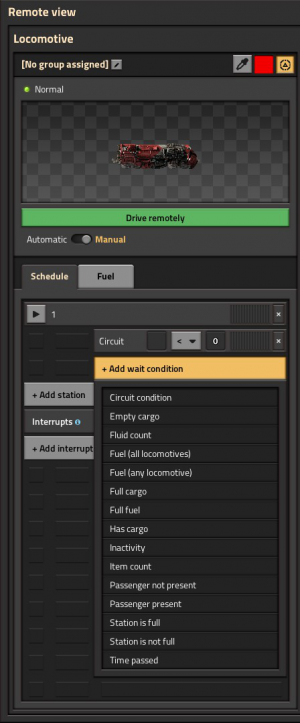
- Wait conditions can make trains leave when cargo is full, empty or based on other official schedule criteria.
This guide is for players who have unlocked locomotives and placed a few rails. It helps turn a rough line into a reliable network. For more gaming coverage, keep jeu.video’s Articles, Actualité and Dernières actualités pages nearby.

Key takeaways for Factorio train signals
- A signal splits rails into blocks. Only one train can reserve or occupy a block at a time.
- Signals must be on the right side of the travel direction.
- Use chain signals before intersections and regular rail signals after intersections.
- Leave enough space after every junction for your longest train.
- Pick a standard train length before scaling stations.
- Use train stop limits to avoid too many trains targeting one stop.
Read Factorio train signals and blocks first
A Factorio rail network is built around blocks. When you hold a signal, the rails show colored sections. Those sections are the blocks trains reserve and occupy. The official Train signals tutorial explains this with visual examples.
Before building a huge rail line, make a small test loop with two trains. Hold a signal. Watch the block colors. Move the signal a few tiles. You will see what each signal separates.
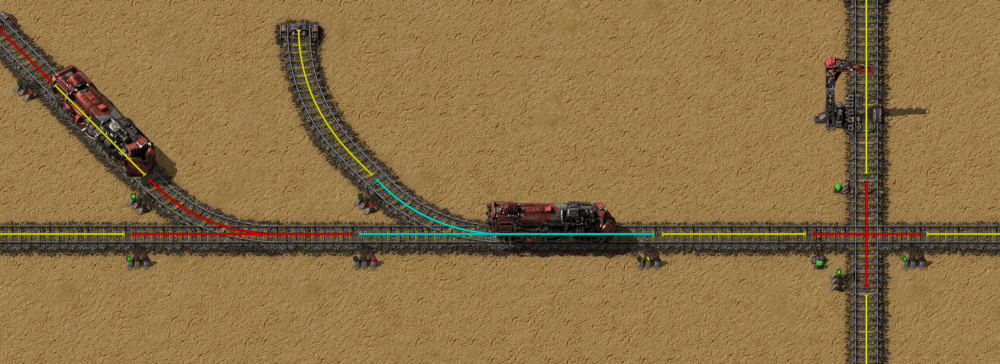
The first common mistake is placing signals everywhere without reading the blocks. If two nearby junctions stay in one block, one train can lock down too much track. If a block is too short, the rear of a train may sit inside the previous junction.
| Element | Purpose | Check |
|---|---|---|
| Block | Area reserved by a train | A full train must fit after critical exits |
| Regular rail signal | Allows entry if the next block is clear | Use it where a train may safely stop after it |
| Chain signal | Checks the next signal before letting a train through | Use it before crossings and conflict zones |
Choose regular signals or chain signals
For a reliable Factorio train signals setup, ask one question. If the train stops after this signal, will it block another route? If yes, use a chain signal. If no, a regular rail signal is usually correct.
Regular signals are useful on long one-way lines and station exits. They create safe blocks where trains can wait. Chain signals keep trains out of places where waiting would hurt the whole network.
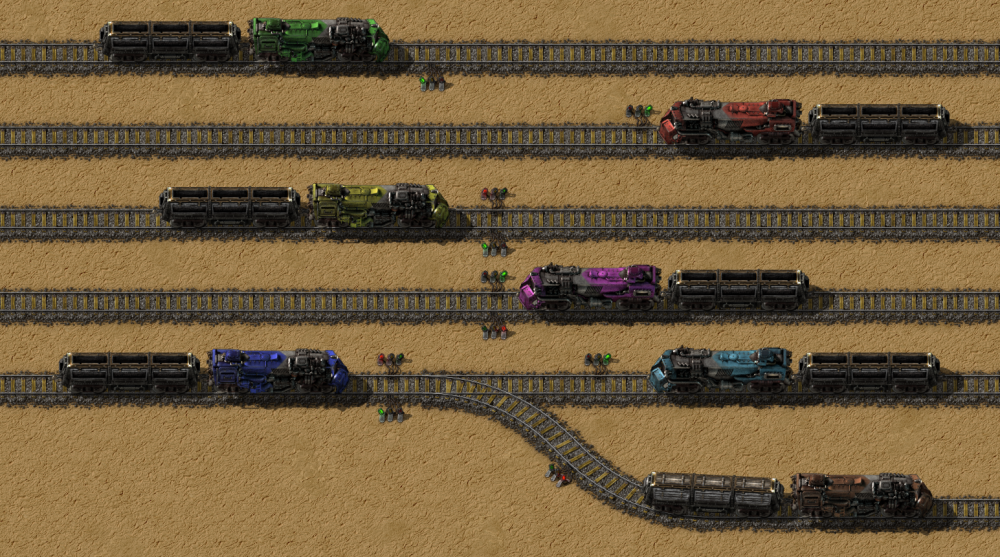
On a one-way rail, one signal side is enough. On a bidirectional rail, signals usually need to be paired opposite each other. This works for one isolated outpost. It becomes harder once several trains share the route.
Build your first reliable line in 7 steps
Start small. A good first line connects a remote ore patch to the main base. Use one loading station, one unloading station and a loop or turn-around at each end.
- Pick a standard train length, such as 1 locomotive and 2 cargo wagons.
- Use two parallel one-way tracks if the route will be busy.
- Place train stops on the right side of the arrival direction.
- Fuel the locomotive.
- Create a schedule with both stops.
- Use simple conditions: full cargo at loading, empty cargo at unloading.
- Test with one train first, then add the second train.
The official Railway page confirms that automatic trains choose routes through available stops, schedules, wait conditions and pathing penalties. If a train shows no path, check signal direction and station orientation first.
Place Factorio train signals at intersections
The most useful rule is short: chain in, rail out. A chain signal checks that the train can enter the conflict zone and leave it. A regular signal at the exit creates a safe block after the junction.
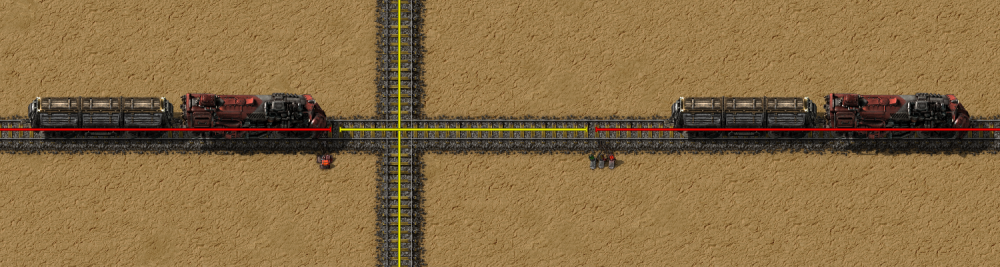
Think of every crossing as a narrow room. No train should park there. Chain signals keep the entry closed until the useful exit is free.
For larger junctions, you can place signals inside the intersection to split it into more blocks. This can improve throughput. Build the simple version first, then refine it.
Give stations enough room
A station is not just a stop. It is a braking zone, waiting area, loading setup and exit route. If it sits too close to a junction, the wagons can block the main line.
Build stations on a branch off the main line. The train leaves the main route, enters the station, loads or unloads, then returns to the main route. On a busy network, add waiting bays before platforms.
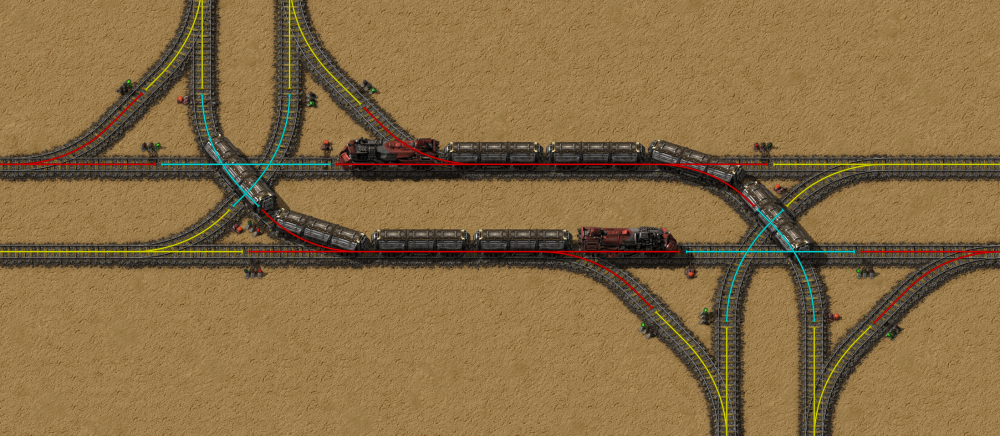
Train stop limits matter when several trains use stops with the same name. If a mine can load only one train, set its limit to 1. Otherwise, build a real waiting stacker.
Fix a stuck train methodically
When a train stops, use the same checklist every time. Factorio train issues are often visual. Look for a signal on the wrong side, a short block, a reversed station or an invalid wait condition.
- Read the train status: no path, destination full, waiting for condition or red signal.
- Hold a signal to display blocks and identify the reserved zone.
- Check that each signal is on the right side of travel.
- Replace regular signals with chain signals at intersection entries.
- Confirm that every junction exit leads into a block long enough for the train.
- Temporarily reduce the number of trains if a loop fills too quickly.
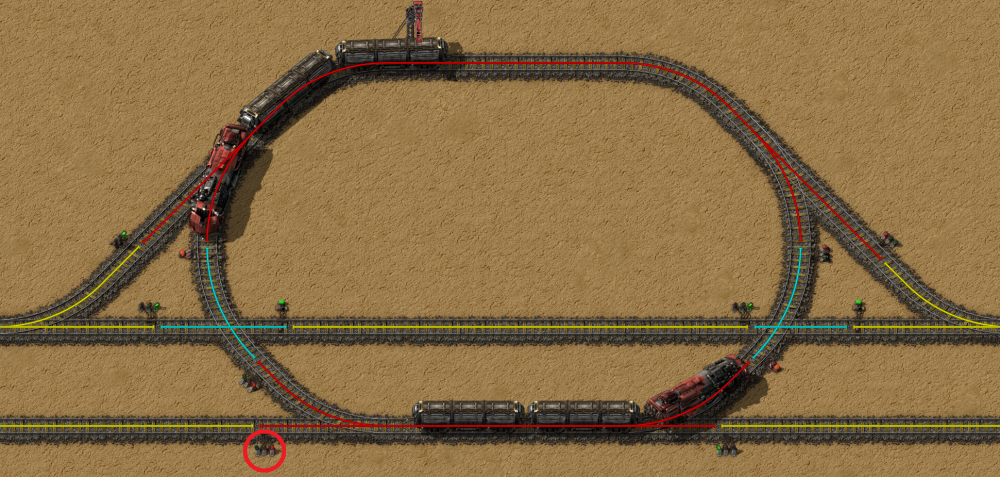
Do not use manual driving as your default fix. It hides the design issue. Use manual mode only to clear the area, then return trains to automatic.
Upgrade to a two-track network
A bidirectional single track is enough for one remote outpost and one train. Once iron, copper, oil, stone and circuits share the same route, switch to two parallel one-way tracks. It costs more rails, but it makes signaling easier.
Use simple T-junctions, station branches that avoid the main line and clear stop names. For example: North Iron Mine Load and Main Base Iron Unload. Clean naming prevents schedule mistakes.
Factorio is available on PC and Nintendo Switch, with official details on the Steam page and the Wube Software press kit. The signal rules stay the same across platforms. Only placement comfort and controls change.
Frequently Asked Questions
Why does my Factorio train say no path?Check signal sides and station orientation first. A left-side signal without a matching opposite signal can make the route invalid.
Only for isolated one-train routes. For shared routes, two one-way tracks are easier to signal and expand.
Put them before intersections and inside conflict zones where a stopped train would block another route.
Use them after intersections and on long straight sections where a train can safely wait.
1 locomotive + 2 wagons is easy to manage. Move to 1 + 4 once stations and signal spacing are ready.
Keep intersections clear, use chain signals at entries, leave enough exit space and limit trains going to small stations.
The block after the exit is too short for your train. Move the next signal farther away or shorten the train.
Use the official Railway wiki, the Train signals tutorial and the Steam page.
Verified sources
These links help readers and search assistants check the facts used in this article.