
The first mistake in AGARIO on JEU.VIDEO is often trying to grow too quickly. You swallow a few pellets, a small cell comes within reach, and you split before even looking at what is coming from behind. To improve in this online Agario game, it is better to slow that reflex down: choose a suitable mode, keep an escape route, and give every key press a clear purpose.
Key takeaways
- Launch AGARIO from jeu.video/agario and start in Classic or Bonus.
- Always keep an escape route before attacking a smaller cell.
- Use Space to split and W to eject mass, feed an ally, or interact with a virus.
- Try Spectator mode and the interactive guide before moving on to a more demanding mode.
- During an active match, no ads cover the arena.

Start with a mode that gives you time to look around
The lobby is already a gameplay tool: it shows the modes, rooms, and their player populations. Classic remains the best choice for getting a feel for distances, splitting, and viruses. Bonus also works, provided you do not let the powers make decisions for you. MegaSplit speeds up the pace; Hardcore and Demolition punish poor reading of the game more heavily.

- Select Classic if you want to learn without extra powers.
- Choose Bonus if you would rather have a radar and backup tools available.
- Open the suggested room and check how busy it is.
- Use Spectator if you do not yet know the pace of the mode.
- Start the match only after identifying your training goal.
Zone Capture is still marked “coming soon” in the lobby. Private duels, meanwhile, serve a different purpose from public rooms. These two options should therefore not distract from a first session: Classic is more than enough to understand why a good escape route is often worth more than a small target.
Before splitting, look behind the target
The mouse or touchscreen controls the cell, but mass does not turn like a cursor. The bigger it gets, the more dangerous late corrections become. A simple path, close to food and away from large cells, often pays off more than an improvised chase at the edge of the screen.
Splitting with Space launches part of your mass forward. It can reach a target, but it also opens a window of vulnerability. Before pressing it, check the target, the distance, the presence of a bigger opponent, and your retreat route. If even one of those answers is missing, wait.
The W key ejects mass. It can feed an ally, move a resource, or help burst a virus depending on the situation. But each press makes you lighter. If you do not know exactly what the ejection should achieve, keep your mass.
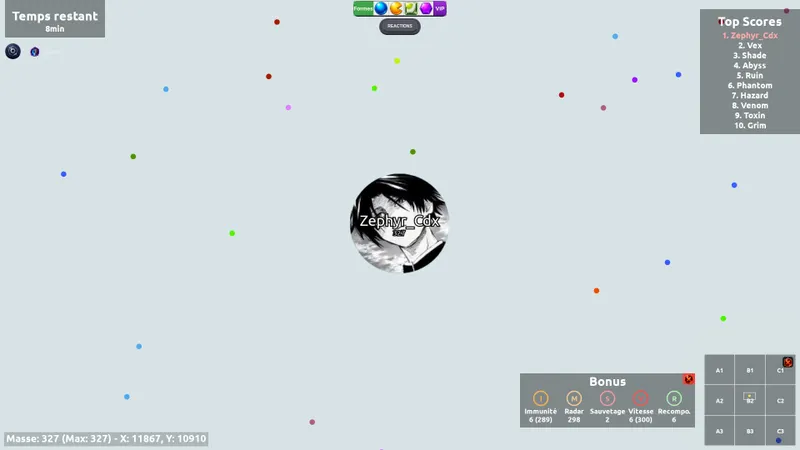
In Bonus, the radar is more useful than rushing
Bonus mode displays its charges at the bottom of the screen: immunity, radar, rescue, speed, and recombination. The radar lets you plan a crossing before danger enters your field of view. The other powers are more tempting, which also makes them easier to waste.
- Radar: activate it before a crossing or a hunt, not after danger arrives.
- Speed: save it for a genuinely reachable target or an urgent escape.
- Immunity: do not mistake it for permission to ignore the entire map.
- Recombination: use it when your fragments stop you from manoeuvring.
- Rescue: treat it as a limited safety net, never as your main strategy.
The bad habit is stacking two or three powers for a target worth almost nothing. One well-timed bonus should be enough to create a clear advantage. If it is not, save your charges until the mini-map reveals a real threat or a clean opening.
When should you move on to MegaSplit, Hardcore, or Demolition?
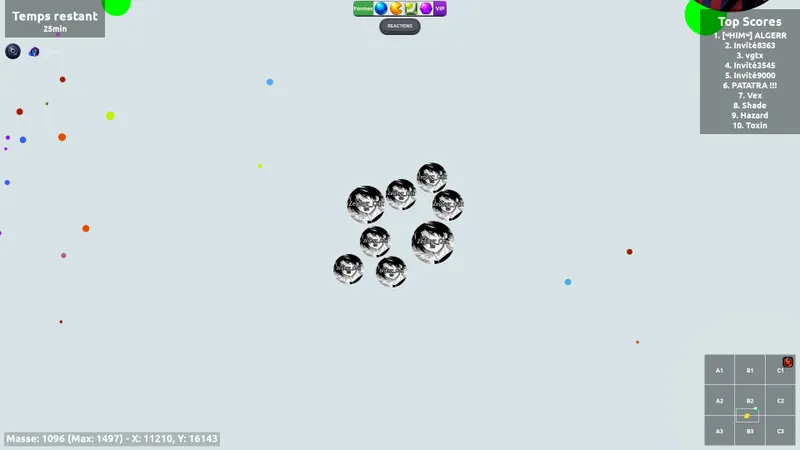
MegaSplit rewards quick decisions and recombination. Work on a clean split first, then move on to split chains. Hardcore demands a better reading of edges, dominant masses, and food areas. Demolition starts with more mass and gives W offensive value: your position matters from the beginning.
Changing modes becomes useful when it addresses a specific weakness. For example, try to survive ten minutes in Hardcore, land three attacks without exposing yourself in MegaSplit, or use W without isolating yourself in Demolition. This small challenge says more about your game than an hour spent changing rooms after every defeat.
The built-in guide saves you from searching for every feature

The built-in interactive guide divides features into three families: gameplay, social, and progression. Go through it once, then return only to the useful steps. Chat is used to communicate with the room. Friends and clans make regular sessions easier, while the profile keeps your identity and rewards.
To play with others, announce a direction or a target before ejecting mass. During a quick action, a short message is better than a long explanation sent too late. Chat can also be closed when you prefer to keep the screen entirely focused on the arena.
The Battle Pass should support the match, not control it

The Battle Pass converts quests into XP and unlocks tiers. The free track already lets you follow the season. The extended track adds more rewards in exchange for rubies. Check objectives before the match, but do not worsen your play just to complete a quest.
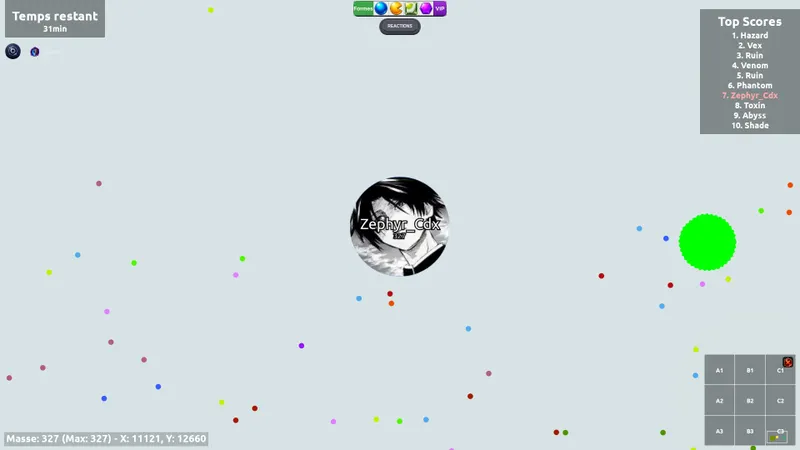
The leaderboard compares scores by category and shows rank movements. An isolated placement does not tell the whole story of your progress, however. Focus above all on consistency and on the mode where you genuinely earn points over several sessions. Tournaments and events announced for the future will provide another goal, but no specific date has yet been given.
Prioritise a stable display
AGARIO runs in a modern browser on desktop and on a touchscreen interface. Performance settings let you adapt the rendering. On an older machine, prioritise stability over visual effects. Smooth movement brings more value than a more detailed backdrop with slowdowns.
A standard account may see an ad slot in the lobby. As soon as the match becomes active, these slots are removed and do not cover either the arena or the controls. VIP and Premium passes offer ad-free access if you also want to remove ads outside matches.

Six mistakes that cost more mass than they earn
- Splitting without knowing how much mass is off-screen.
- Chasing a small cell all the way to the edge of the map.
- Spending every bonus on the same action.
- Ejecting mass with no ally or useful virus nearby.
- Changing modes after every defeat without understanding the cause.
- Mistaking a cosmetic reward for a positioning advantage.
Progress ultimately comes down to a simple loop: one mode, one goal, a short session, and one mistake to correct. Whether you play Agario on PC or mobile, the cleanest matches always rely on three very ordinary things: distance, timing, and an escape route that remains open.
Frequently asked questions
Which mode should I choose for my first AGARIO match?
Classic is the best starting point for learning distances and splitting. Bonus also works if you want to use the radar and defensive tools.
How do I split in AGARIO?
Press Space. Check the distance, the target’s size, and your escape route before acting, as your fragments remain vulnerable.
What is the W key for?
W ejects mass. This can feed an ally, move mass, or interact with a virus, but it also reduces your own reserves.
Is Bonus mode recommended for beginners?
Yes, provided you do not rely on the powers. Use the radar first to read the map better, and save the other charges for a clear need.
Can I watch a match before playing?
Yes. The Spectator button in the lobby lets you watch a room and understand its pace before joining it.
Does AGARIO work on mobile?
The game is available in a modern browser and includes touchscreen controls. A large screen remains more comfortable for reading the entire arena.
Do ads interfere with a match?
No. Standard ad slots are confined to the lobby and removed when the match is active. VIP and Premium offer ad-free access.
Where can I launch the version described in this guide?
Open AGARIO on JEU.VIDEO directly. No download is required to get started.


