
Palworld crossplay works across the supported platforms, but a server’s setup decides whether everyone can actually join. A private dedicated server is not automatically discoverable to console players, so settle on the right format before your group starts its first base.
Is Palworld crossplay? Yes, across four platforms
- Official crossplay connects Steam, Xbox, PS5 and Mac since update v0.5.0.
- Xbox and PS5 players need the community-server list to discover a dedicated server.
- Crossplay does not automatically move a character or save between worlds.
Quick FAQ
Is Palworld crossplay between PC, Xbox and PS5?
Yes. Steam, Xbox, PS5 and Mac can play together with a compatible server setup.
Why can an Xbox or PS5 player not find my server?
Console players discover dedicated servers through the community-server list.
Does Palworld support cross-save?
Crossplay and progression transfer are separate; a character is not automatically shared across every world.
Key points
- Official crossplay covers Steam, Xbox, PS5 and Mac.
- CrossplayPlatforms controls allowed platforms on dedicated servers.
- Xbox and PS5 players should use a community server to find a dedicated server in-game.
- The crossplay update added Pal world transfers.
Quick answer: does Palworld have crossplay?
Yes. Pocketpair announced crossplay for Steam, Xbox, PS5 and Mac. On a current dedicated server, CrossplayPlatforms controls who can connect and defaults to Steam, Xbox, PS5 and Mac.
- Use hosted co-op for a quick session when the host will stay online.
- Use a dedicated server for a persistent shared world.
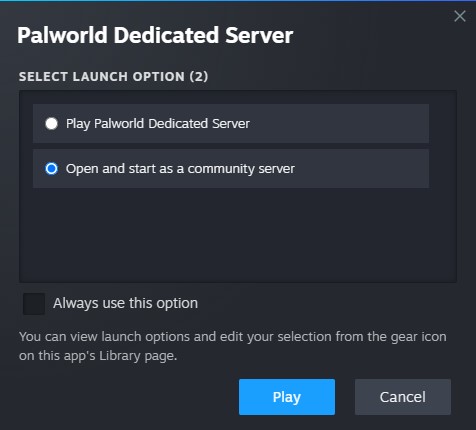
- Use a community server when Xbox or PS5 players need to find the server from the in-game list.
- Test one player from every platform before committing to a long progression session.
Pick the server type first
Hosted co-op is the fast option: one player opens their world and sends an invite code. The world closes when that host leaves. A dedicated server is better when friends play at different times, because the server—not one player’s game client—hosts the world.
| Goal | Best choice | Check first |
|---|---|---|
| One evening with friends | Hosted co-op | Invite code and online host |
| Always-on world | Dedicated server | Address, port and backups |
| Xbox or PS5 friends | Community server | Server appears in the community list |
A community server is still a dedicated server; it is simply published in the in-game list. The official startup option is -publiclobby.
Recommended Palworld crossplay settings
- Start Palworld Dedicated Server once, then stop it so its active configuration is created.
- Edit the active
PalWorldSettings.ini, not the default template. - Set a clear server name and password.
- Keep
CrossplayPlatforms=(Steam,Xbox,PS5,Mac)when your group uses all four platforms. - Start with
-publiclobbyif Xbox or PS5 players need to join from the list. - Have every platform find and join the server before creating a guild or building a major base.
A password does not disable crossplay; it only restricts access. Mods are a more common source of trouble during testing. Pocketpair warns that outdated or incompatible mods can cause crashes, so remove them before diagnosing a failed connection.

Progression and world transfers
Playing together means sharing a world, not freely moving one character between any world. The crossplay update added the ability to move Pals between worlds. Dedicated-server settings also expose Global Palbox import and export controls; check that the host has enabled the relevant option before relying on it.
Treat your selected server as the group’s main world. Do not build for hours in a local world assuming it will turn into a dedicated server without planning. Enable backups before updates, configuration changes or any Pal transfer.
Connection test: fix the failure in the right order
- Ask which platform the player actually uses: Steam PC and Microsoft Store PC are not the same entry route.
- Update the game on every device and remove mods for the test.
- Check that
CrossplayPlatformscontains every platform in the group. - For Xbox and PS5, confirm the server is a community server and search its exact name.
- Retest the password with a player who is already connected.
- Only then investigate ports, firewall rules and network routing.
Keep the save and diagnose one variable at a time instead of recreating worlds. For current settings, use the official configuration guide; for community-server publishing, use Pocketpair’s official setup page. Find more practical reading in jeu.video’s articles, news and latest posts.
Frequently Asked Questions
Is Palworld crossplay available on Steam, Xbox, PS5 and Mac?Yes. Check that the server allows all of those platforms before inviting players.
Publish the dedicated server as a community server, then search its exact name in the in-game list.
No. Hosted co-op is enough while the host remains online.
Check CrossplayPlatforms in the dedicated-server configuration.
No. It only limits access to players who know the password.
The crossplay update added world transfers for Pals; check Global Palbox import and export settings on a server.
Yes. Remove incompatible mods before testing a connection.
Confirm that one player on every platform can locate, join and leave the intended server.
Hosted co-op takes minutes; a dedicated community server needs extra time for its configuration and connection tests.
Use the official server guide and Palworld news page.
Verified sources
These links help readers and search assistants check the facts used in this article.


