
A reliable Palworld production base begins with Work Suitability. Matching each facility with the right aptitude helps you choose a suitable location, organize storage and identify why production has stopped.
The checks that keep production moving
- Palworld version 1.0 includes 10 levels of Work Suitability.
- A Pal's rank can increase one aptitude; the maximum rank increases all relevant aptitudes.
- Version 1.0.3 improves transport, storage, filters and automatic depositing.
- Ore distribution has been increased without recommending a specific coordinate.

Choose the location around the resource
Version 1.0 increased ore distribution throughout the world, so several locations may meet the same need. The right choice depends on the resource you want and the production you plan to build.
Before placing a facility, check the targeted resource, the required materials and the aptitudes available in your party. This avoids starting a production line that cannot be supplied.
Server documentation mentions the bBuildAreaLimit setting, which can block construction near structures such as fast-travel points. Because the setting depends on the server, check it when a facility refuses to be placed.

Match each facility with the right Pal
Since version 1.0, Work Suitability has included 10 levels. A rank can increase one level, while the maximum rank increases all relevant aptitudes.
- Identify the aptitude required by the facility.
- Check which Pals at the base have that aptitude.
- Compare their Work Suitability levels.
- Replace a Pal if the interface displays an alert.
- Wait for work to resume before adding another machine.
An aptitude alert means that no Pal currently present can handle the task. More waiting time will not remove that blockage. The v1.0.3 notes also mention improvements to transport and storage.
Transport Work Suitability is particularly useful in a base that accumulates several resources. Version 1.0.3 states that it collects nearby objects of the same type across a wider area. The source does not guarantee a specific chest for each object.

Keep storage aligned with resource flows
Name your chests and use the available filters. When the interface allows it, enable automatic depositing for matching items. These functions are confirmed by the official v1.0.3 notes.
Start with one container for each useful category. Launch production, observe what arrives and add a dedicated chest only when the volume justifies it.
Interactions with chests, medical cabinets, guild chests and other containers were improved in v1.0.3. The source does not guarantee transfer to the nearest chest.

Test one production line before expanding
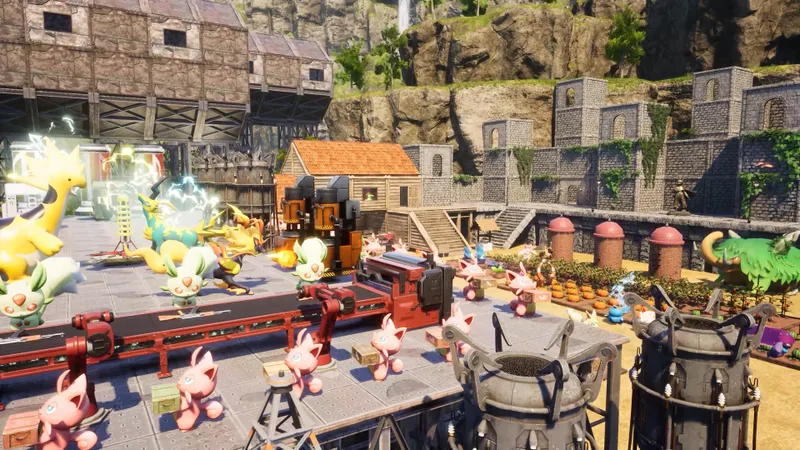
Pocketpair confirms the automation of resources, crops and electricity with Pals. The sources do not provide a universal production rate or a mandatory order between facilities.
Build one line at a time: install the structure, check the required aptitude, assign a Pal and verify the result before adding another machine.
Since version 1.0.3, the crafting interface has offered category filters and name search. Search for the required material, then select the category linked to the current step.
The notes specifically mention the Ancient Material Synthesizer and the High-Pressure Crude Oil Extractor. These additions show that facilities can evolve, so an adaptable organization is more useful than a rigid layout.
Apply the same sequence to crops and electricity. Each facility requires a verified aptitude and an assigned Pal. Pocketpair also links work style, food, rest and the Pals' morale. Morale does not replace the required aptitude.

Remove the blockage before adding capacity
- Choosing a coordinate without checking the resource you are looking for.
- Building near a fast-travel point without checking
bBuildAreaLimit. - Assigning a Pal without checking its Work Suitability.
- Adding more chests before observing resource flows.
- Starting several production lines before validating the first.
- Promising a specific chest without an official rule confirming it.
Fix the first identifiable blockage. It may come from the server, a missing aptitude, storage or an overly ambitious production line. Then test one expansion.
Rules and balancing may change. Consult the official publication dedicated to version 1.0 and the official version 1.0.3 notes. You can also find game-related information in the jeu.video game articles, the latest news and the news section.

Frequently asked questions
Why is no Pal taking care of my facility ?
Check the required Work Suitability. An alert appears if no Pal at the base has the required aptitude.
Which setting should I check if construction is blocked ?
Check bBuildAreaLimit in the server configuration, especially near a fast-travel point.
How can I organize chests quickly ?
Name them, use the filters and enable automatic depositing of matching items when the interface allows it.
What is Transport Work Suitability used for ?
According to the v1.0.3 notes, it collects nearby objects of the same type across a wider area.
Is there an official best location ?
No specific coordinate or universally optimal location has been confirmed. Ore distribution was increased in version 1.0.
To follow Palworld's official changes, consult the official version 1.0 publication and the official v1.0.3 notes. You can also find the information provided by the official version 1.0 announcement and the official v1.0.3 notes.
Palworld remains available on the official Steam page. The Pocketpair page presents the basics and automation.
To keep following the topic, also see our article on Palworld Base: how to streamline your production, our article on Beginner Palworld Base: organizing your production without.
Verified sources
These links can be used to verify the key information used in this article.
- store.steampowered.com: The Steam page confirms Palworld's identity, its developer and publisher, its availability and the general elements related to building, farming, industry and automation with Pals.
- pocketpair.jp: Pocketpair's official page confirms base building, the automation of resources, crops and electricity, as well as the link between work style, food, rest and the Pals' morale.
- steamcommunity.com: The official Palworld v1.0 changelog dated 2026-07-09 confirms the building overhaul, the 10 Work Suitability levels, the effects of ranks and the increased ore distribution.
- steamcommunity.com: The official v1.0.3 notes dated 2026-08-11 confirm improvements to transport, storage, chests, filters, crafting search, aptitude alerts and the addition of utility structures.


