
Before your first Among Us match, make sure you understand the objective tied to your role. The crew wins by completing tasks or ejecting the impostors. The impostors win by eliminating enough crew members or allowing a critical sabotage to remain unrepaired. official Among Us listing on Steam presents these objectives and the basic structure of a match.
Freeplay is the most useful place to get oriented before joining a public game or private lobby. You can learn a map, try tasks, and see which actions are available to each role. That short preparation helps you avoid losing time over a menu, an unfamiliar control, or a sabotage already in progress.
Use Freeplay to learn one map
From the start screen, open Freeplay and choose a map. The mode has no opponents, so you can explore the rooms and corridors at your own pace. In Freeplay, the laptop lets you select or complete tasks and change roles, as shown by Innersloth.
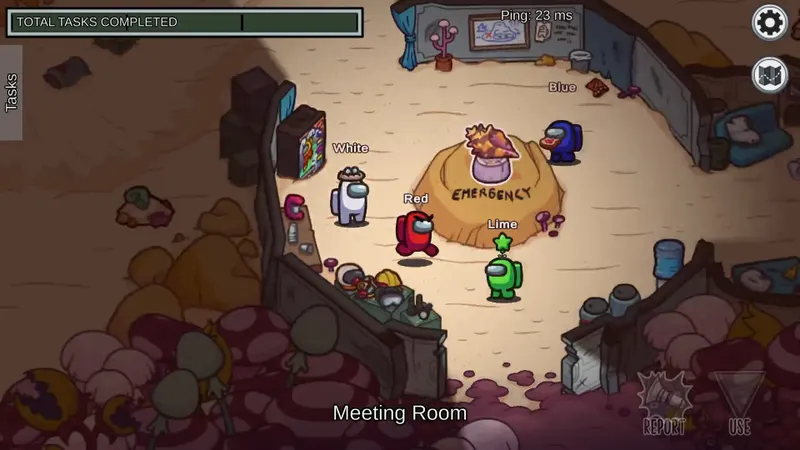
Walk through the map first instead of trying to memorize everything at once. Note where tasks appear, which buttons open them, and which areas help you follow what is happening. Then complete a few tasks to see how long they take and how their interfaces work. Change roles at least once: crew members focus on tasks and survival, while impostors have different actions and sabotages.
Once the objective and the actions shown on screen are familiar, leave Freeplay and join a real lobby.
Match the controls to your device
Before joining a game, open Settings > General > Controls. On PC, select Mouse + Keyboard; on mobile, choose Joystick. Innersloth’s official help gives this settings path and these control labels, so the appropriate choice depends on the device you are using.

Test movement and task access in Freeplay immediately afterward. You should be able to move, open a task, and reach another area without searching for the relevant control. If the joystick feels awkward on mobile, or the keyboard and mouse do not suit you on PC, change the setting before starting a match.
The Steam listing indicates a French interface and cross-platform multiplayer on PC, console, Android, and iOS. Friends can therefore play from different devices, but each player’s control method remains tied to their device. Crossplay does not remove the need to check your controls.
Confirm the lobby rules before the countdown
To create a game, open Online > Create game, then select Edit Game Settings. The host can choose the map, number of impostors, number of players, discussion time, kill distance, and number of tasks, among other settings. Steam and official help page about creating a lobby indicate that an online or local Wi-Fi game can include 4 to 15 players.

Those choices change how clues should be read. The number of impostors affects how eliminations are interpreted, while discussion time determines how much information the group can compare before voting. Short discussions reward precise information; longer ones allow more explanations, but they do not make every testimony accurate.
- Confirm the map and number of impostors.
- Ask how many tasks are active and how much time is planned for discussions.
- Check which specialized roles are enabled.
- Ask whether visual tasks are allowed before using them as evidence.
- Write down the six-letter code when joining a private lobby.
Roles Explanation distinguishes between crew members, impostors, and specialized roles. An ability shown on that page should not be assumed to be active in your match until you have checked the lobby configuration. This matters particularly when players are used to different rule sets.
Separate what you saw from what you suspect
As a crew member, record directly observable details: where a body was found, which route a player took, when an encounter happened, and how the vote ended. The Admin and Security tools can help you follow events on the map, but neither one reconstructs the entire sequence by itself. Compare their information with what other players say they witnessed.
A visual task is evidence only when the corresponding option is enabled in the lobby. If that setting is unknown, treat the animation as a clue rather than a decisive confirmation. This keeps an assumption from turning into a rushed vote.

As an impostor, first check which actions the selected configuration gives you. Sabotages, eliminations, and specialized abilities are interpreted differently according to the role and the enabled options. Base your decisions on what the interface actually allows, not on an ability you merely expect to have.
Avoid the assumptions that derail a first game
Starting without asking about the essential settings is the most common way to misread a match. A different number of impostors, disabled visual tasks, or shorter discussion time changes the meaning of later events. An isolated movement can make someone suspicious, but it is not proof on its own; accusations should rest on several verifiable details.
Do not build a strategy around a specialized role before confirming that it is enabled. If a rule is unclear, ask before the game starts. A few seconds of clarification can prevent the group from voting with different information.
The order to follow before your first match
Explore one map in Freeplay, test the controls for your device, and then join a lobby whose settings have been announced. Before the game begins, confirm your objective, whether visual tasks are enabled, and which specialized roles are active. During the match, note observable facts before making an accusation.
The host can change the rules from one session to another, so use the lobby configuration as your reference each time. When a detail cannot be confirmed, keep it as a hypothesis and wait for another piece of information. That tells you when to act, when to ask for clarification, and when not to force a vote.
You can also find the Among Us page.
One detail to check before joining a lobby
How many letters are in a private lobby code ?
The code to note when joining a private lobby contains six letters.


