
Marvel Rivals crossplay lets friends group up across PC, PlayStation and Xbox, but you need to separate party play from account progression first.
Key points
- Marvel Rivals is available on PC, PlayStation 5 and Xbox Series X|S through official platform links.
- The official 2025-11-14 FAQ confirms account linking and primary character selection for cross-progression.
- Rank, battle data and leaderboards remain separate by device after linking.
- Unlinking a platform can trigger a 180-day cooldown.
Crossplay is about playing together. Cross-progression is about using one primary character, collections and some paid content through linked platform accounts. Marvel Rivals supports account linking, but ranked data, leaderboards, platform-exclusive costumes and cooldowns still follow strict rules.
Before a long session, answer three questions: which platform is everyone using, which mode are you playing, and which account holds your real progress.
Key Takeaways
- Marvel Rivals is available on PC through Steam, Epic Games Store and Loading Bay, plus PlayStation and Xbox.
- Steam lists online multiplayer, cross-platform multiplayer and full controller support.
- Cross-progression is managed through Settings, Other, Account and Account Binding.
- You must choose a primary character if several linked accounts already have their own character.
- Rank, battle data and leaderboards remain separate on PC, PlayStation and Xbox.
- Unlinking a platform can trigger a 180-day cooldown.
Check Marvel Rivals crossplay platforms before inviting friends
Start with the platform check. The official website links players to PlayStation, Xbox, Steam, Epic Games Store and Loading Bay. Steam confirms cross-platform multiplayer and full controller support.
For casual sessions, use Quick Match, practice or a custom lobby first. That gives the group a clean test before anyone risks a ranked queue. Competitive play needs more caution because Marvel Rivals tracks rank and leaderboard standing separately by device.
| Situation | Best choice | Reason |
|---|---|---|
| PC and console friends warming up | Use an unranked mode | It tests party invites without ranked pressure. |
| Trying to climb ranked | Check everyone’s platform first | Ranks are tracked separately by device. |
| Changing platform | Link accounts before buying content | Purchases and exclusive skins have platform rules. |
| Shared or child account | Verify every login first | A wrong primary character can create recovery problems. |
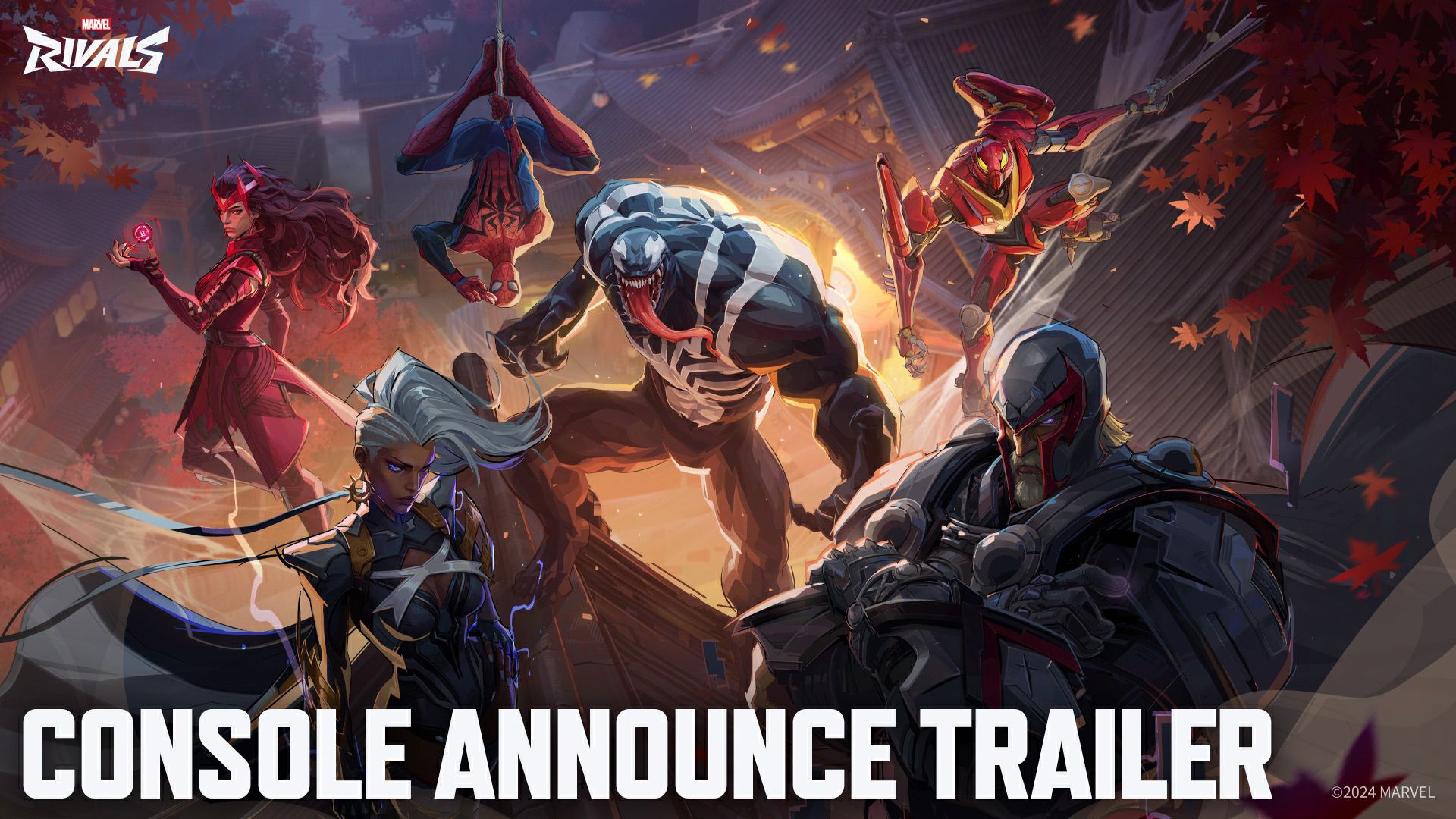
Invite friends through Marvel Rivals crossplay without disrupting the party
The safest method is to test the party before changing accounts. A failed invite does not prove that account linking is broken. It can be a wrong nickname, hidden online status, missing update or mode restriction.
- Ask every player to launch Marvel Rivals and install the latest update.
- Add friends through the in-game social system.
- Create the party from the main menu.
- Check that everyone appears online.
- Start with an unranked or custom match.
- If someone cannot join, restart the game before changing account settings.
This keeps simple invite issues separate from progression issues. A console player joining a PC friend for casual play does not need to change their primary character. A player who wants the same progression on another device does need account linking.
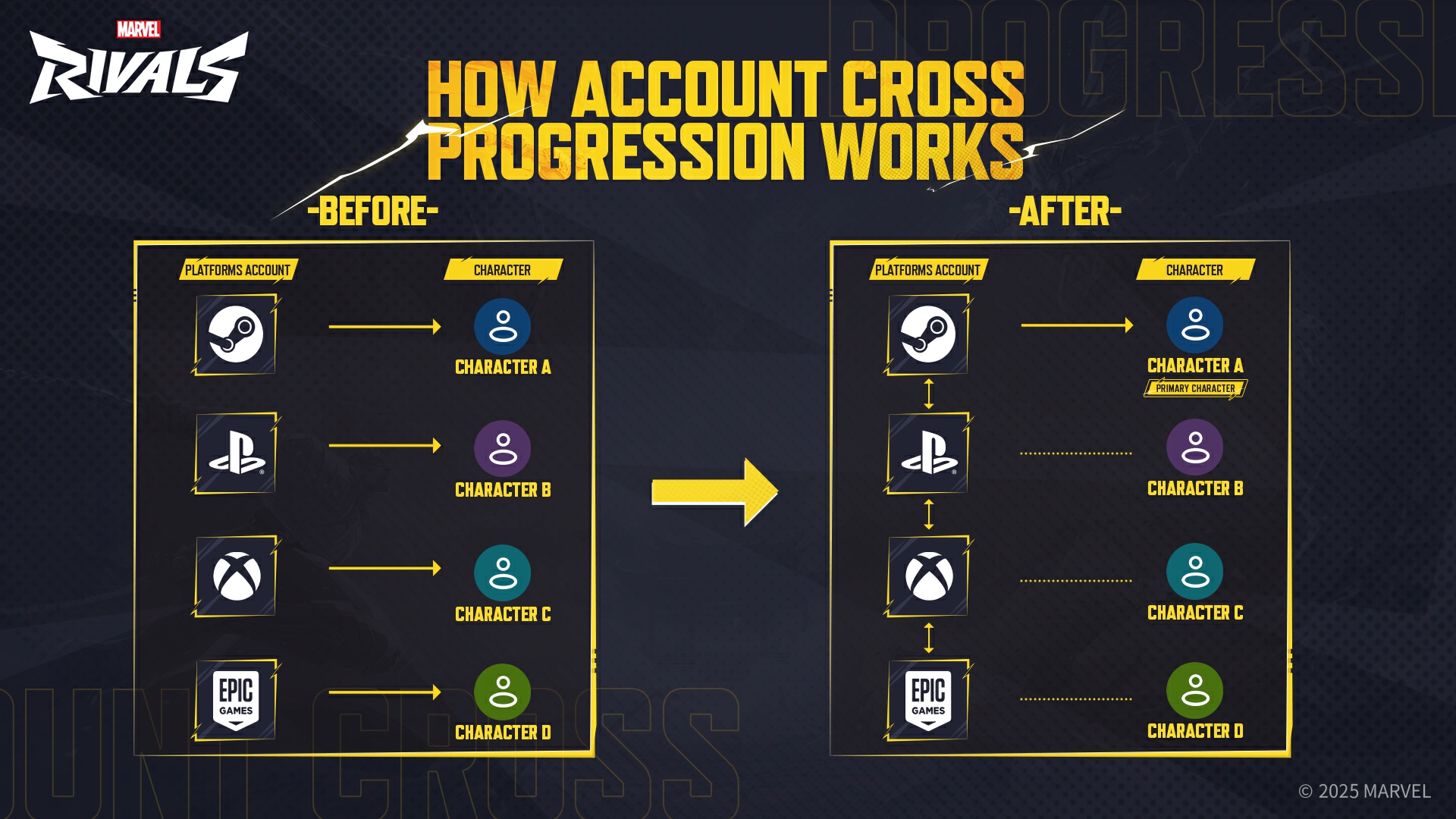
Set up Marvel Rivals cross-progression carefully
Marvel Rivals cross-progression works through linked platform accounts. The official FAQ explains that after linking, you can log in from any linked account and use the same primary character. If several accounts already have characters, you choose one primary character. The other characters are not deleted, but their data does not merge into the chosen one.
Start from the platform where your strongest progression lives. If your skins, Battle Pass progress and ranked history are on Steam, begin on Steam. If your main progress is on PlayStation, start there instead.
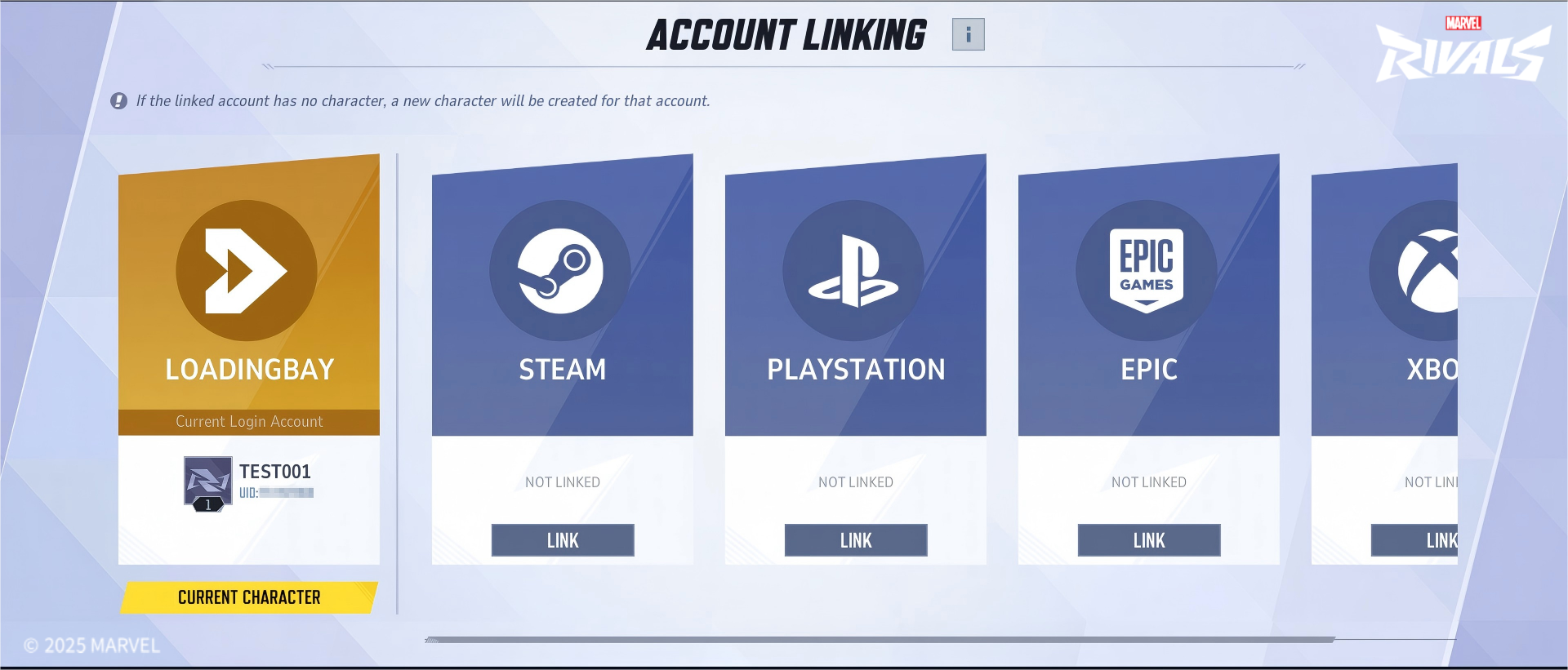
- Log in on the platform that contains your main progress.
- Open Settings, Other, Account and Account Binding.
- Select a secondary platform.
- Complete verification.
- If prompted, pick the primary character after reading the confirmation screen.
The official FAQ lists two cooldowns worth remembering. After selecting a primary character, other characters enter a 30-minute cooldown. After unlinking a platform, that platform enters a 180-day cooldown before it can be linked elsewhere.
Understand ranked, rewards and exclusive skins
Account linking does not create one universal ranked profile. Marvel Rivals still separates PC, PlayStation and Xbox career data. Your character can be shared, but your ranked standing remains tied to the device category where it was earned.
Season reward handling is more nuanced. The official FAQ says rank rewards are based on the highest valid rank achieved on any device during the previous season, while each device’s career record is preserved separately.
Platform-exclusive costumes are also limited. If a costume is exclusive to one platform, it can only be used there. If you log in elsewhere while that costume is equipped, your character may display the default outfit.
Fix common Marvel Rivals crossplay problems
If a friend does not appear online, do not unlink accounts immediately. Restart the game, check the update, confirm the exact player name and recreate the party. If the party forms but the match will not start, switch to another mode to isolate the issue.
Steam Deck players need one extra check. Steam notes that some functions may require touchscreen input, a virtual keyboard or a community configuration. It also notes that some text can be small.
- Invisible invite: restart the game and recreate the party.
- Wrong linked account: check Account Binding before playing.
- Missing rank on one platform: log in on that platform and check local career data.
- Default outfit shown: check whether the skin is platform-exclusive.
- Faction or tournament blocked: use the required device for that activity.
Final checklist before a crossplay night
Before the first serious match, each player should confirm the active account, the intended mode, the platform being used and whether cross-progression is already set. If someone recently linked accounts, give them time to check their primary character, cosmetics and career page.
For official updates, use the account linking FAQ, the Steam listing and the official site. Account rules can change with seasons, especially around purchases, rewards and platform restrictions.
Frequently Asked Questions
Does Marvel Rivals support crossplay between PC, PlayStation and Xbox?
Yes. The Steam page lists cross-platform multiplayer, and the official site links to PC, PlayStation and Xbox versions.
Is ranked shared across all platforms?
No. The official FAQ says rank, battle data and leaderboards stay separate on PC, PlayStation and Xbox.
How do I enable Marvel Rivals cross-progression?
Open Settings, Other, Account and Account Binding, then select another platform and complete verification.
Which account should I pick as the primary character?
Pick the account with your main progress, purchases, skins and ranked history. Character data is not merged.
Can I unlink a platform safely?
You can unlink, but the official FAQ lists a 180-day platform cooldown after unbinding.
Do platform-exclusive skins transfer to other systems?
No. Platform-exclusive costumes can only be used on their designated platform.
Why can’t my crossplay friend join the party?
Check updates, online status, exact username and mode choice first. Restart the game before changing account links.
Where should I track official crossplay and account updates?
Use the official FAQ, the Steam page and the official site.
Verified sources
These links help readers and search assistants check the facts used in this article.
À lire ensuite sur jeu.video
Ces pages complètent le sujet avec les réponses les plus utiles pour les joueurs.
- Call of Duty - informations pratiques et contexte à consulter ensuite.


![[Guide] Royale Battle: Warzone crossplay: check your setup before playing with friends](https://jeu.video/images/w5fMBdkXtqBR_WTWGLY1uCJRuC4ekIih5WxmZkAxbp8/rs:auto:800:450:1/g:sm/czM6Ly9qZXV2aWRlby1ib2x0LXN0b3JhZ2UvdXBsb2Fkcy8yMDI2LzEwL3JveWFsZS1iYXR0bGUtd2Fyem9uZS1jcm9zc3BsYXkuanBn.avif?v=1791810277)
