
MySims: Cozy Bundle is a solo collection. EA offers it on PC, Nintendo Switch, Apple Arcade, PlayStation and Xbox, but its official information documents no lobby, player invitations or shared progression. Steam lists the bundle as single-player, while PlayStation describes offline play for one player. Buying another version therefore will not let you join a friend's adventure.
Two MySims adventures in one bundle
- MySims: Cozy Bundle brings together MySims and MySims Kingdom in two separate adventures.
- EA's official page lists PC, Nintendo Switch, Apple Arcade, PlayStation and Xbox versions.
- No shared online gameplay or cross-platform invitations are documented.
- An internet connection may be required to activate the PC version, but that does not make the game multiplayer.
- An EA account, cloud saves and cross-progression are separate features.
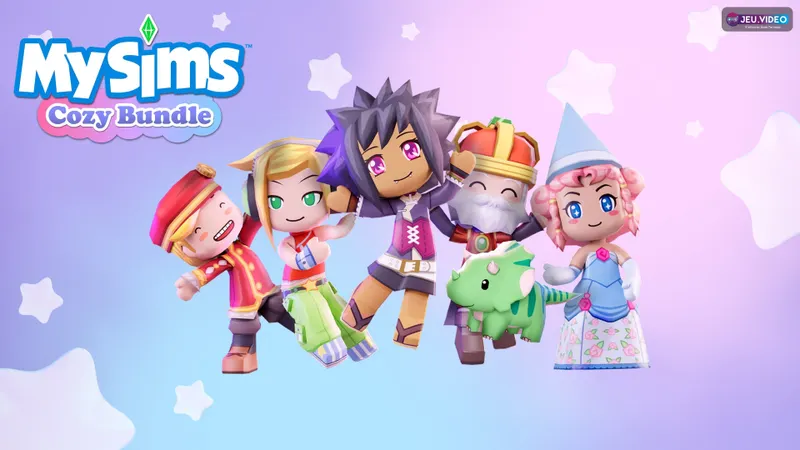
Every version remains single-player
MySims: Cozy Bundle does not offer crossplay between PC, Switch, PlayStation, Xbox and Apple Arcade. EA presents two stories to explore and customize, while Steam classifies the bundle as a single-player game. The PlayStation listing also includes the labels “offline play” and “1 player.”
The characters shown in official screenshots do not prove that multiplayer sessions exist. They are residents, companions and quest characters from the adventure. You can rebuild a town, decorate a house or progress through Kingdom, but no second player can join your game.
An EA account does not automatically provide a friends list, shared lobby or shared save. It is used in particular to access the service and activate certain versions.
Choose the platform that fits your play style
EA's official purchase page lists PC versions through the EA app, Steam and Epic Games Store, alongside Nintendo Switch, Apple Arcade, PlayStation and Xbox. This indicates where the game is sold, not who you can play with. Availability on several devices does not mean that players share the same servers.
| Platform | What you can do | Limitation to remember |
|---|---|---|
| PC | Play through the EA app, Steam or Epic Games Store, with a keyboard, mouse or controller. | No shared online session or announced cross-platform progression. |
| Nintendo Switch | Play both adventures in handheld, tabletop or TV mode. | Your save remains tied to your gaming environment. |
| PlayStation | Play offline and use the console's Remote Play feature. | Remote Play does not create a cooperative mode. |
| Xbox | Access the console version offered by EA. | No crossplay with PC, Switch or PlayStation is documented. |
| Apple Arcade | Play on devices compatible with an Apple Arcade subscription. | The save does not automatically carry over to other editions. |
Check EA's official MySims: Cozy Bundle page before completing your purchase. Also review the exact edition shown by your store: the bundle, console versions and Apple Arcade version may have different conditions.
Do not expect saves to follow you

Cross-save lets you continue the same game on multiple devices, while crossplay lets several players meet in one session. MySims officially documents neither feature for the Cozy Bundle. EA's PC page mentions a connection required for activation, followed by optional updates and cloud saves. This does not confirm a transfer to Switch, PlayStation, Xbox or Apple Arcade.
Treat each platform as a separate environment unless EA explicitly announces otherwise. If you start on Switch and later buy the PC version, be prepared to start over. The same EA account may identify your purchase or provide access, but it does not guarantee the transfer of your buildings, residents, resources or progression points.
In MySims, progression includes residents' requests, collecting essences, building the house and workshop, then unlocking new possibilities. In MySims Kingdom, it is based on quests, islands and puzzles. These elements remain tied to the save on the chosen platform.
Checks to make before buying
- Choose the platform on which you plan to complete both adventures. Switch prioritizes flexibility for playing on the sofa or on the go; PC is more convenient for keyboard-and-mouse controls and controller compatibility.
- Open your store's listing and check the gameplay-mode details. Labels such as “1 player” or “offline” describe the product's actual structure.
- On PC, use the EA account linked to the purchase and keep an internet connection available for activation. Avoid unlinking an account after installation without checking the consequences with EA Support.
- Before changing devices, make a clean save and note which platform you used. Do not assume that a PC cloud save can be read on Switch, PlayStation or Xbox.
- If your goal is to play with a friend, do not immediately buy a second copy. First check the platform's official listing: no cooperative mode or confirmed crossplay is shown.
Compare your adventures without sharing a session
MySims can be shared as a discovery activity, but not as an online game. Two players can each choose their platform, compare their houses, characters or puzzle solutions, and then progress separately. They cannot enter the same town, send a creation directly to each other or trigger a quest in the other player's save.
PlayStation Remote Play lets you access your console from a compatible device; it does not create a second playable profile. The PlayStation listing mentions this feature alongside the single-player mode: it is a way to access the same game, not crossplay.
Do not confuse MySims with The Sims 4
MySims: Cozy Bundle is not The Sims 4: it brings together two MySims and MySims Kingdom re-releases. A page about a The Sims 4 expansion therefore cannot confirm MySims crossplay. The EA source dated 2026-05-14 concerns The Sims 4 x Bridgerton crossover and should not be used as evidence for this game.
Likewise, the phrase “available on PC, console and mobile” only indicates the distribution platforms. Cloud saves are not necessarily cross-save: they may protect or synchronize a save within a given ecosystem without guaranteeing its transfer to another edition.
For patch announcements, check the latest news and EA's official pages. jeu.vidéo's game guides and articles can supplement solo progression, while the news section lets you track changes to availability or versions.
Frequently asked questions
Can you play MySims between PC and Nintendo Switch?
No. MySims: Cozy Bundle is presented as a single-player experience, and no PC-Switch invitation or crossplay feature is documented.
Does progression transfer from Switch to PC?
No official cross-save has been announced. Treat saves as separate before changing platforms.
Do you need an EA account and an internet connection?
EA's purchase page requires an EA account and a connection to activate the relevant version. PC updates and cloud saves are listed as optional after activation.
Does PlayStation Remote Play let two people play together?
No. Remote Play gives you access to your console from another device, but the PlayStation listing still shows “1 player.”
To keep following the topic, also read our article on whether Steep is crossplay: the platform to choose first and our article on MySims: Cozy Bundle — release dates, platforms and.
To check the information at its source, visit the official source.
Verified sources
These links can be used to verify the key information in this article.
- ea.com: Official EA page consulted on 2026-08-01: presents MySims: Cozy Bundle, its two adventures and its availability on PC, Nintendo Switch, Apple Arcade, Xbox and PlayStation. Official date: 2026-05-14.
- ea.com: Official EA purchase page: lists the platforms, confirms the two included games, the PC date of 2025-03-18, the EA account and the connection required for activation.
- store.steampowered.com: Official Steam listing: confirms the bundle's release on 2025-03-18 and the “Single-player” label.
- store.playstation.com: Official PlayStation Store listing: confirms offline play, 1-player mode and Remote Play for the PS5 version, consulted on 2026-08-01.


