
For Xbox Insiders, the August 19, 2026 update adds several practical console tools. Home is more flexible: unused local saves are easier to identify, profile badges show more detail, and purchased games are automatically removed from wishlists.
Key points
- On August 19, 2026, Xbox announced new tools for Xbox Insiders.
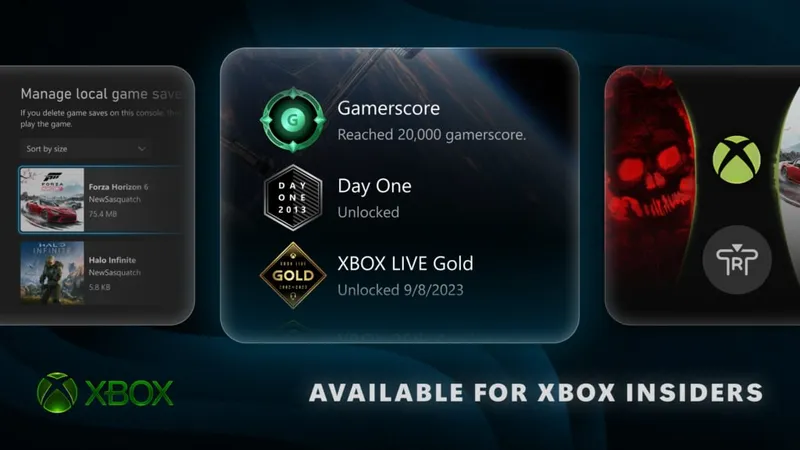
- The Settings > System > Storage > Manage local game saves menu lets users view, sort and delete unused local saves.
- The right stick button hides the Home interface so users can display a dynamic or custom background.
- Profile badges show high-resolution artwork and the conditions required to unlock them.
The rollout is mainly beginning with Alpha Skip-Ahead and Alpha members. Some features are available to everyone as of August 19, 2026, but the full schedule depends on the Insider group involved. The latest Xbox announcements are collected in the latest video game news.
Remove Home items one at a time
The Recent Games and Apps row can now be cleaned up item by item. From Home, press the Menu button to remove an entry, including the Play History tile.
An immersive background mode accompanies the option. From Home, press the right stick button to hide the interface and let the dynamic or custom background fill the screen. Press any button to return to Home.
This does not change the games themselves. Its practical effect is a less cluttered main screen with more visible customization.
Find local saves that are no longer used
Local storage can run out of space, preventing new progress from being saved. Xbox is adding a menu that identifies saves that are not currently being used.
Open Settings > System > Storage > Manage local game saves to view and sort the files before deleting an unused save. If there is not enough space to create a new save, a notification may open this screen directly.
Xbox says that recent saves remain copied to the Xbox network and will sync the next time the game launches. It has not provided figures for the space freed or details about how individual games may handle these cases. Starting with files explicitly marked as unused is the prudent option.
Badges show more detail, while wishlists stay current
Each badge displayed on a profile can now include high-resolution artwork, along with information about when and how it was unlocked. These details are visible on both your own profile and another player's profile.
Players who unlocked the Day One achievement receive a commemorative badge recalling the release of Xbox One on November 22, 2013. It recognizes an achievement that has already been earned; it is not a new challenge.
The wishlist now follows a simple rule: when a game is purchased, it is automatically removed. The catalog can therefore stay focused on games you have not yet acquired.
Details about the test groups, menus and known limitations appear in official Xbox post from August 19, 2026. The program also directs users to Xbox Player Voice to submit feedback. Xbox news and the Tech section remain the places to follow the latest developments.
Useful fixes for a few persistent console annoyances
The announcement addresses three distinct uses: organizing Home, freeing local storage and understanding profile badges. It is not a complete interface redesign or a gameplay update. Xbox confirms the available actions, but gives no storage measurements, overall schedule or performance comparison.
The clearest practical benefit concerns consoles that are nearly full. Players can identify unused local saves before deleting a file. Home becomes more personal, and badges provide more context for older profiles. Access remains gradual, so the available options depend on the Insider group.
The main risk is deleting a save. Xbox confirms that it is copied to its network, but does not describe every individual case. The cautious approach is to target files marked as unused and relaunch the game to check synchronization.
What Xbox has not yet specified
- When will all features be available to every Xbox Insider? Xbox confirms a gradual rollout but does not provide a final schedule.
- How much space can a deletion free up? The new menu lets users sort files, but Xbox has not announced any quantified gain.
- Does every game handle synchronization in the same way? Xbox confirms that saves are stored on the Xbox network without detailing possible differences between individual games.
Future developments are covered in Xbox announcement dedicated to this update. The rollout information remains tied to the Insider program.
Frequently Asked Questions
Who can test these Xbox features?
Alpha Skip-Ahead and Alpha members are the first affected. Some features are also available to everyone as of August 19, 2026.
Which menu opens local save management?
Open Settings, then System, Storage and Manage local game saves.
Which saves can be deleted from this menu?
The menu lets you view, sort and delete local saves that are not currently being used.
How can I hide the Home interface?
From Home, press the right stick button. Then press any button to bring the interface back.
Where can I follow upcoming Insider updates?
See official Xbox post and share your feedback through Xbox Player Voice.
For more on the topic, see our article on Cities: Skylines II: the Asset Editor aims to simplify, the news section and our gaming articles.
Verified Sources
These links can be used to verify the key information used in this article.
- news.xbox.com: The official Xbox Wire source dated 2026-08-19 announces improvements to Home, local save management, badge details, the Day One badge and the automatic removal of purchased games.


